 Figma
Figma API
API Web to code extension
 Adobe XD
 Discord
 Twitter
 GitHub
'/%3E%3Cpath%20fill='%23b2b2b2'%20d='M241%20382q0%2016%2017%2026%2017%2011%2042%2011t42-11q16-11%2017-26V269H241'/%3E%3Cpath%20fill='%239f7e00'%20d='M241%20379q0%2014%208%2023%209%209%2021%209%2014%200%2021-9%209-9%209-23V269h-59'/%3E%3Cpath%20d='M241%20339v-70h59v110q0%2014-9%2023l-6%205v-68h-15v72q-8%200-14-4v-68zm59%2040c0%2022%2015%2032%2029%2032%2021%200%2030-18%2030-32v-40h-59'/%3E%3Cpath%20fill='%239f7e00'%20d='M266%20277v5h2v12h-3v-5h2v-5h-9v5h2v5h-4v9h3v18h-5v10h34v-10h-5v-18h3v-9h-4v-5h2v-5h-9v5h2v5h-3v-12h2v-5zm42%20101q0%2010%206%2017%206%206%2015%207%2010-1%2016-7%206-7%206-17v-29h-43'/%3E%3Ccircle%20fill='%230044ad'%20cx='329.5'%20cy='372'%20r='6'/%3E%3Cellipse%20fill='%230044ad'%20cx='300'%20cy='340'%20rx='16'%20ry='21'/%3E%3C/svg%3E)


'%3E%3Cpath%20stroke='%23000'%20stroke-width='4'%20d='m-35-37-13%2020m5%203%2013-20m5%203-13%2020m63%2042%206-9m1-2%206-9m5%203-6%209m-1%202-6%209m5%203%206-9m1-2%206-9m-96%200%2013%2020m5-3-6-9m-1-2-6-9m5-3%2013%2020m63-42-6-9m-1-2-6-9m5-3%2013%2020m5-3-6-9m-1-2-6-9'/%3E%3Ccircle%20r='24'%20fill='%23cd2e3a'/%3E%3Cpath%20fill='%230047a0'%20d='M0%200a12%2012%200%201%201%2020%2013%2024%2024%200%201%201-40-26A12%2012%200%201%200%200%200'/%3E%3C/g%3E%3C/svg%3E)


'%3E%3Ccircle%20r='92'/%3E%3Ccircle%20fill='%23fff'%20r='80'/%3E%3Ccircle%20r='16'/%3E%3Cg%20id='c'%3E%3Cg%20id='b'%3E%3Cpath%20id='a'%20d='m0-80%203%2048L0-8-3-32M21-77%2011-30%202-8%205-32M40-69%2019-26%204-7%2013-29'/%3E%3Cuse%20href='%23a'%20transform='scale(-1)'/%3E%3C/g%3E%3Cuse%20href='%23b'%20transform='rotate(45)'/%3E%3C/g%3E%3Cuse%20href='%23c'%20transform='rotate(90)'/%3E%3C/g%3E%3C/svg%3E)


'/%3E%3C/svg%3E)


'/%3E%3C/svg%3E)
'/%3E%3C/g%3E%3Cuse%20href='%23b'%20transform='rotate(45%20140%20300)'/%3E%3Cpath%20d='m299%20285%2046%2015-46%2015%2028-39v48M59%20510l-36%2032%2010-47%2020%2043-42-24m22-409L23%2058l36%2032-48-4%2042-24'/%3E%3C/svg%3E)


'/%3E%3C/svg%3E)
 Blog
Blog
How to Transfer ChatGPT Context to Claude and Keep Both Working on the Same Project9 min read
Reading Time: 6 minutesShort answer: You can bring useful ChatGPT memory into Claude, but that does not move your full chat archive or create a live connection between the assistants. For an ongoing project, put the current work and a short shared context document in AgentGrid.io. Give ChatGPT and Claude access to the same two links, so each reads the latest version, contributes to the same work, and leaves a clear handoff.
If you only want Claude to remember your preferences, use Claude’s memory import. If you need a backup of old conversations, request a ChatGPT data export. If you want both assistants to keep working together, use a shared work artifact and a separate project brain. These are three different jobs.
Can you transfer your ChatGPT history to Claude?
Not as a complete, native chat-history migration. Claude’s import feature accepts text about you and extracts memories from it. It does not turn your entire ChatGPT conversation archive into individual Claude chats. OpenAI’s account export gives you a ZIP of eligible account data, including chat history, but downloading it is not the same as importing it into Claude.
Choose the path that matches what you want to carry over:
- Preferences and recurring context: Ask ChatGPT to list its memories and important background. Review that text, then paste it into Claude’s memory import.
- An archive of past chats: Request your data export from ChatGPT and keep the ZIP secure. Pull out only the conversations or outputs you actually need for a particular project.
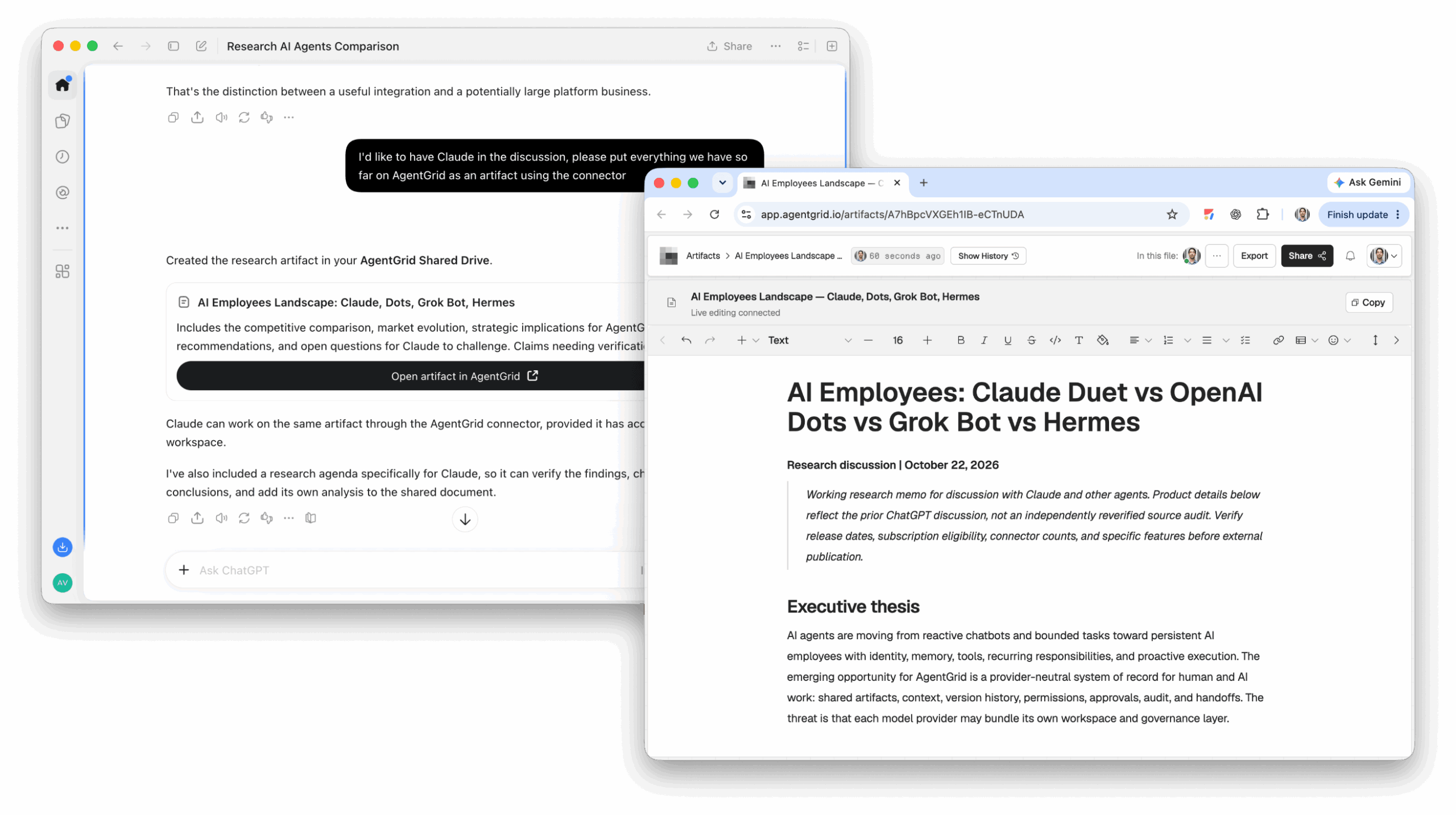
- Work both assistants should continue: Save the current deliverable and project instructions in AgentGrid.io. Connect both assistants and give them the same links.
Trying to paste a large archive into one chat usually mixes outdated decisions, sensitive details, and irrelevant conversations. A short, reviewed project brief is more useful for the next task.
Move your useful ChatGPT memory into Claude
1. Connect ChatGPT and Claude to AgentGrid.io
For a one-time memory import, you can skip the connectors. If both assistants will continue the same project, add the official AgentGrid.io plug-in in ChatGPT and connector in Claude first. Approve access to the work you intend to share.
If the install option differs in your account, see the current AgentGrid.io connection guide.
2. Ask ChatGPT for the context worth keeping
Ask for stored memories, preferences, ongoing projects, tools, decisions, and constraints. Then remove private information you do not want to share. Check names, dates, and project status yourself; a generated list may miss details or include stale ones.
3. Import the reviewed text in Claude
In Claude, open Settings → Memory → Start import, paste your reviewed text, and choose Add to memory. If your account still shows the legacy memory interface, look under Settings → Capabilities → Memory instead. Review what Claude learned afterward. Anthropic describes memory import as experimental and notes that it may not retain every imported detail.
This is a one-time transfer of selected memory, not a synchronized feed from ChatGPT. Changes you make later in either assistant do not automatically update the other.
Export ChatGPT data when you need the original conversations
In ChatGPT, open Settings → Data controls → Export data, then confirm. OpenAI also offers a privacy-request route. The export arrives by email or SMS when ready; the download link expires after 24 hours, and the export can take up to seven days. Check that the ZIP contains the conversations you need. Self-service export availability differs for managed workspaces.
Keep the archive private. Do not upload an entire export to a shared project just to recover one decision. Select the relevant conversation, remove sensitive material, and write down the current conclusion, source, and unresolved question. Deleted chats cannot be restored by requesting an export.
Let ChatGPT and Claude work on the same artifact
A migration answers, “What can Claude know about my earlier work?” A shared project answers, “How can both assistants work on what is current?” For that second job, create two editable items in AgentGrid.io:
- The work artifact: the current draft, report, plan, or app. This is the deliverable, not a copied chat transcript.
- The project brain: a short Markdown document with the goal, confirmed facts, rules, decisions, current assignment, checks, open issues, and next handoff.
This keeps instructions out of the deliverable. The artifact has one stable link and History; each connected assistant can read the current version and, with the appropriate access, update that same artifact. It is not shared private chat memory or automatic awareness of everything said in either service.
1. Save the current work and project brain
Start with one active project, not your entire account history. Ask ChatGPT to turn a relevant conversation into a clean draft and a separate instructions document. Review both before saving them in AgentGrid.io. You can create a new document yourself or ask a connected assistant to save it there.
If ChatGPT cannot create the documents, use AgentGrid.io‘s new-document flow and paste the reviewed material yourself. Do not assume a pasted link gives another agent permission to edit it.
2. Confirm both assistants can open the links
Give each connected assistant the work link and brain link. Ask each to open both before assigning edits. If one cannot, review its connection and access rather than pasting the whole project into chat.
Give ChatGPT and Claude access to the same current work and project brain.
3. Give each assistant a specific turn
For example, ask ChatGPT to revise a product brief, then ask Claude to check it against the confirmed facts. Complete one edit and verify it before the next agent starts editing the same section.
The next assistant repeats that sequence. The latest saved work remains the source of truth; the brain explains why it looks that way and what comes next. Review History when a change is unclear, and restore an earlier version if needed. If you restore the work, note the reason in the brain before continuing.
What should go in the project brain?
Keep it short enough to read at every handoff:
- Goal: what the project must deliver and for whom.
- Confirmed facts and links: only checked claims and the sources that support them.
- Rules: style, constraints, and material that must not change.
- Current assignment: agent, task, and required check.
- Update log: who changed what, what was checked, result, open issue, and next owner.
The brain is an editable project document, not a promise that either model will remember every past chat. Store PDFs, images, or exports as reference material if needed; use an editable document or app for work the agents must actually revise.
Frequently asked questions
Start with one project, not a full account migration
Pick the work you want to continue this week. Save its latest version and a one-page project brain in AgentGrid.io, then connect ChatGPT and Claude to the same work. Give each a bounded task and require a verified handoff. You can carry useful memory into Claude too, but the shared artifact is what lets both assistants continue the actual deliverable.