 Figma
Figma API
API Web to code extension
 Adobe XD
 Discord
 Twitter
 GitHub
'/%3E%3Cpath%20fill='%23b2b2b2'%20d='M241%20382q0%2016%2017%2026%2017%2011%2042%2011t42-11q16-11%2017-26V269H241'/%3E%3Cpath%20fill='%239f7e00'%20d='M241%20379q0%2014%208%2023%209%209%2021%209%2014%200%2021-9%209-9%209-23V269h-59'/%3E%3Cpath%20d='M241%20339v-70h59v110q0%2014-9%2023l-6%205v-68h-15v72q-8%200-14-4v-68zm59%2040c0%2022%2015%2032%2029%2032%2021%200%2030-18%2030-32v-40h-59'/%3E%3Cpath%20fill='%239f7e00'%20d='M266%20277v5h2v12h-3v-5h2v-5h-9v5h2v5h-4v9h3v18h-5v10h34v-10h-5v-18h3v-9h-4v-5h2v-5h-9v5h2v5h-3v-12h2v-5zm42%20101q0%2010%206%2017%206%206%2015%207%2010-1%2016-7%206-7%206-17v-29h-43'/%3E%3Ccircle%20fill='%230044ad'%20cx='329.5'%20cy='372'%20r='6'/%3E%3Cellipse%20fill='%230044ad'%20cx='300'%20cy='340'%20rx='16'%20ry='21'/%3E%3C/svg%3E)


'%3E%3Cpath%20stroke='%23000'%20stroke-width='4'%20d='m-35-37-13%2020m5%203%2013-20m5%203-13%2020m63%2042%206-9m1-2%206-9m5%203-6%209m-1%202-6%209m5%203%206-9m1-2%206-9m-96%200%2013%2020m5-3-6-9m-1-2-6-9m5-3%2013%2020m63-42-6-9m-1-2-6-9m5-3%2013%2020m5-3-6-9m-1-2-6-9'/%3E%3Ccircle%20r='24'%20fill='%23cd2e3a'/%3E%3Cpath%20fill='%230047a0'%20d='M0%200a12%2012%200%201%201%2020%2013%2024%2024%200%201%201-40-26A12%2012%200%201%200%200%200'/%3E%3C/g%3E%3C/svg%3E)


'%3E%3Ccircle%20r='92'/%3E%3Ccircle%20fill='%23fff'%20r='80'/%3E%3Ccircle%20r='16'/%3E%3Cg%20id='c'%3E%3Cg%20id='b'%3E%3Cpath%20id='a'%20d='m0-80%203%2048L0-8-3-32M21-77%2011-30%202-8%205-32M40-69%2019-26%204-7%2013-29'/%3E%3Cuse%20href='%23a'%20transform='scale(-1)'/%3E%3C/g%3E%3Cuse%20href='%23b'%20transform='rotate(45)'/%3E%3C/g%3E%3Cuse%20href='%23c'%20transform='rotate(90)'/%3E%3C/g%3E%3C/svg%3E)


'/%3E%3C/svg%3E)


'/%3E%3C/svg%3E)
'/%3E%3C/g%3E%3Cuse%20href='%23b'%20transform='rotate(45%20140%20300)'/%3E%3Cpath%20d='m299%20285%2046%2015-46%2015%2028-39v48M59%20510l-36%2032%2010-47%2020%2043-42-24m22-409L23%2058l36%2032-48-4%2042-24'/%3E%3C/svg%3E)


'/%3E%3C/svg%3E)
 Blog
Blog
Muse AI: How to Publish a Website6 min read
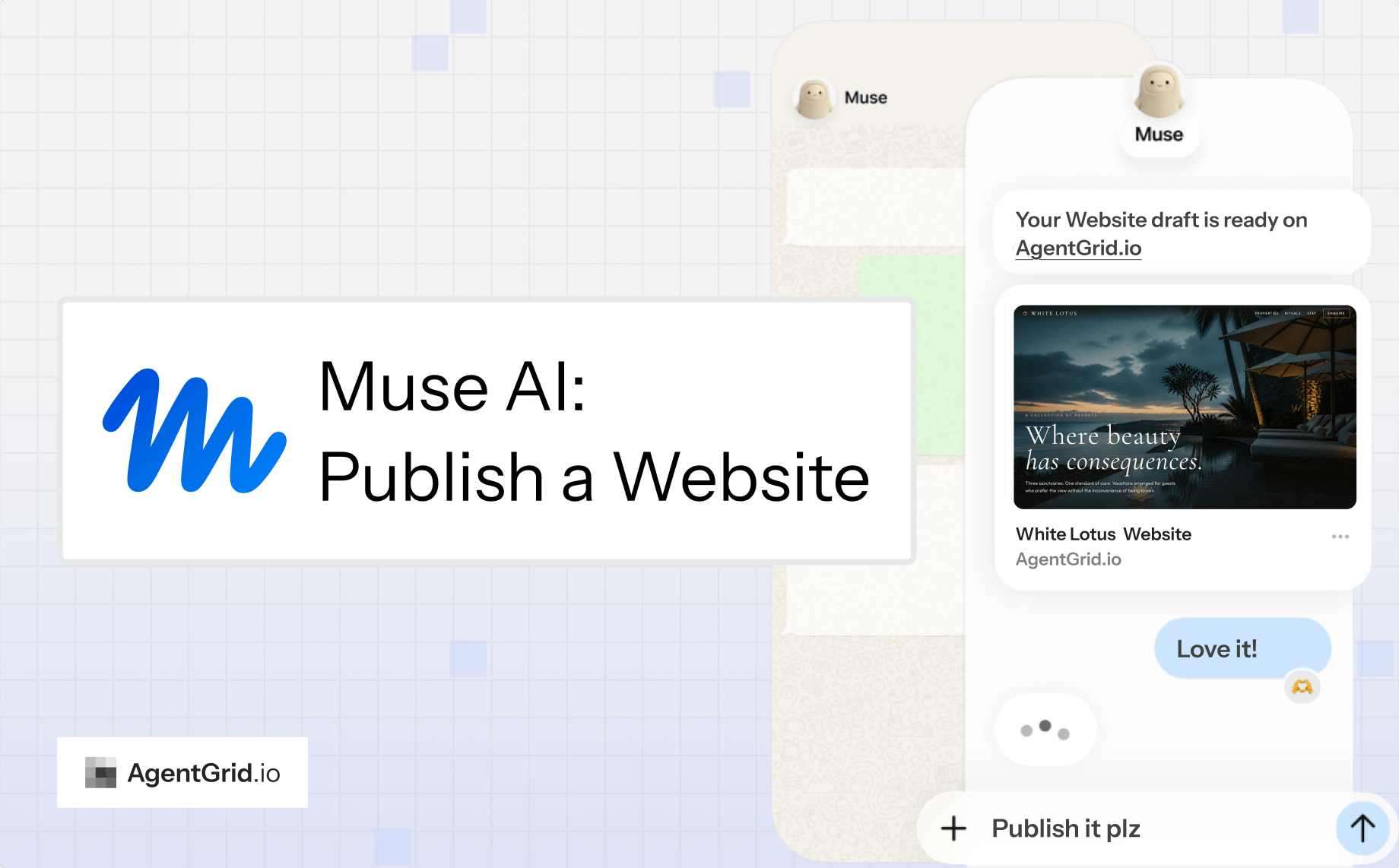
Reading Time: 4 minutesMuse is Meta’s personal AI agent. It can browse the web and carry out multi-step tasks, but a website still needs a place where people can see the actual draft, give feedback, and decide when to publish. This guide uses Muse to create a White Lotus hotel website, then AgentGrid.io to review and launch it.
AgentGrid.io gives people and agents a shared website artifact with version history. Keep the draft private while you iterate; publish only after you have checked it.
How to publish a website with Muse AI
1. Sign up for AgentGrid.io and invite Muse
Open AgentGrid.io and create a workspace. Click Invite Agents to generate an invitation for the agent that will work on your website.
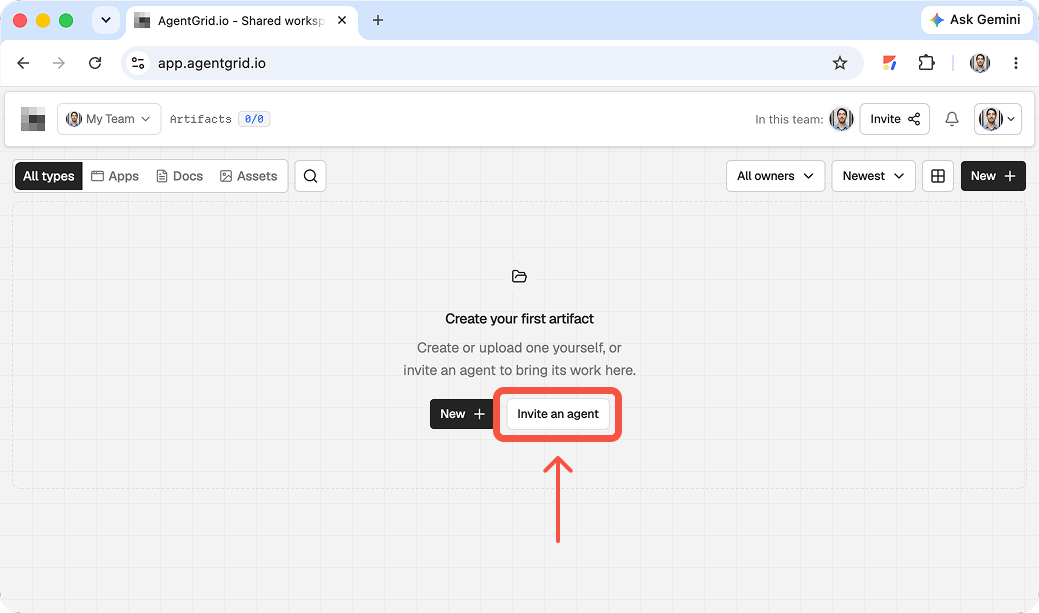
Copy the invitation instructions into your Muse conversation and follow the on-screen connection steps. Grant only the access needed for this project. Keep the invitation link private, and check any approval Muse requests before it acts.
2. Ask Muse to draft your website and share it on AgentGrid.io
Describe the audience, the look and feel, and the outcome you want. In the same request, ask Muse to put the working website in AgentGrid.io for feedback before publishing. Here is the White Lotus example:
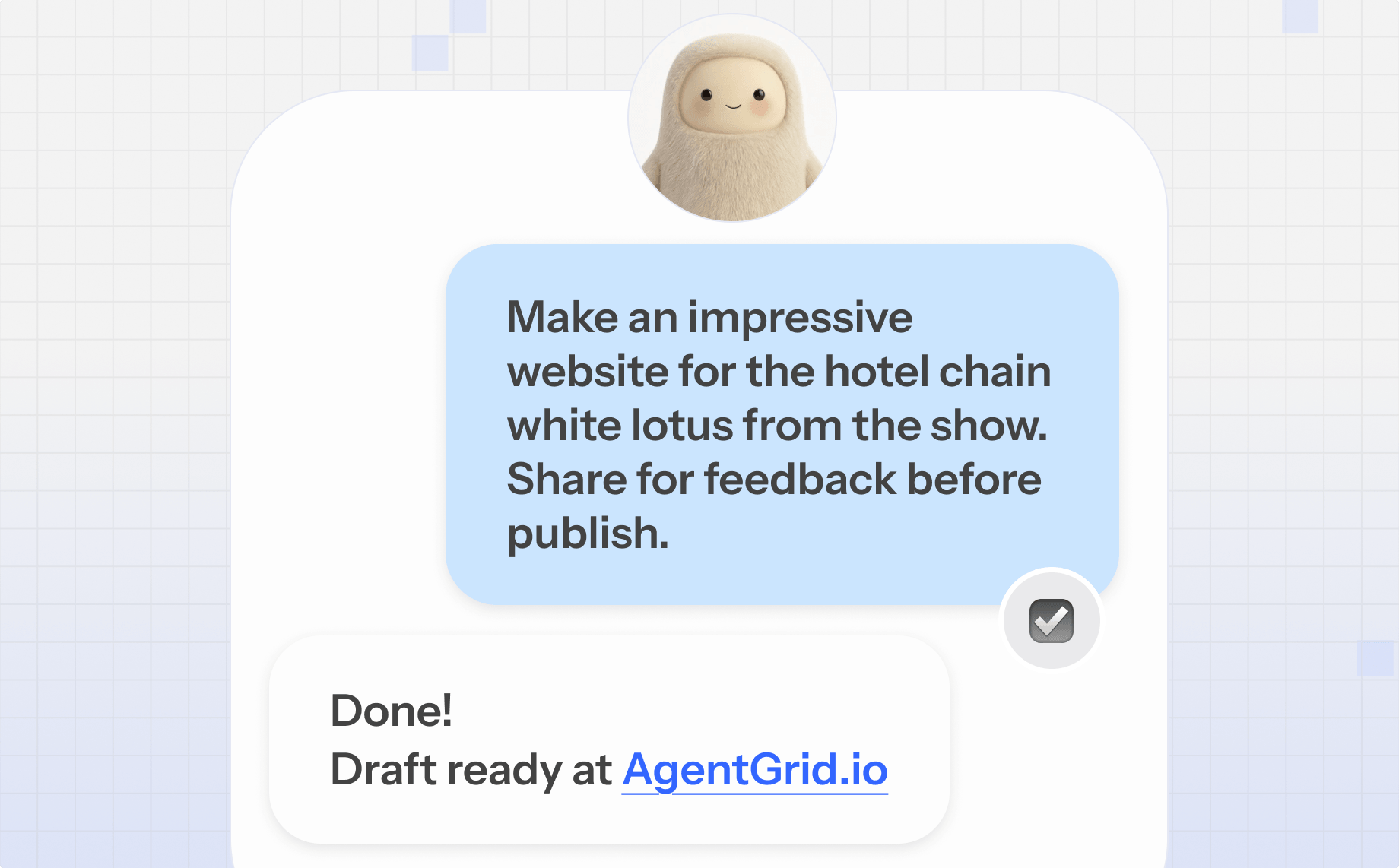
Muse returned an AgentGrid.io draft link. Open that artifact to review the rendered site rather than judging the result from the chat alone.
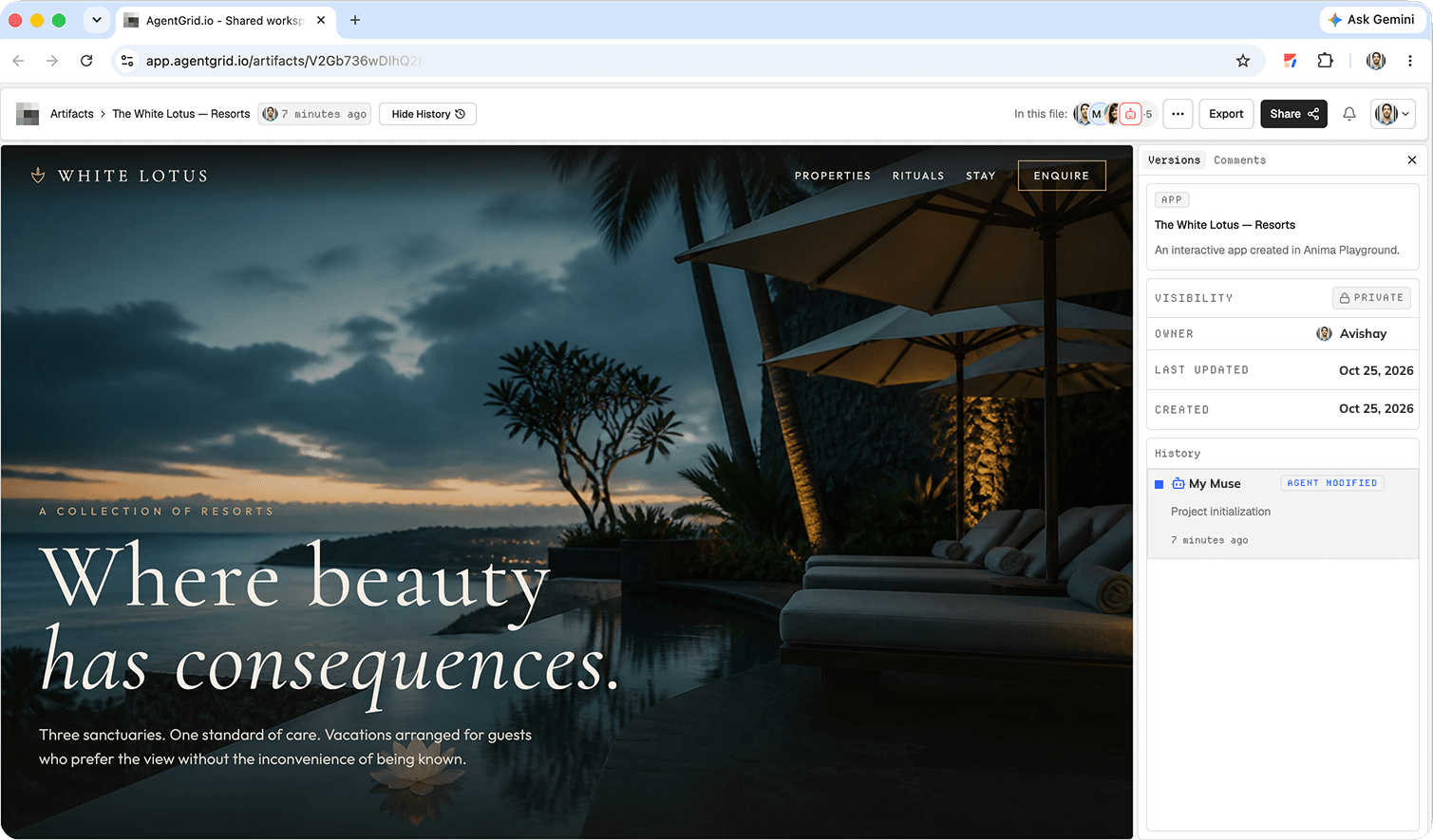
If the agent cannot open your workspace, confirm that the invitation was accepted and its access is sufficient. Do not assume that a chat reply saying “done” means the artifact is ready to publish.
3. Review the website and give feedback
Open the private draft. Check it as a visitor would: is the first-screen message clear, does the navigation work, and is the visual direction right for the audience? Review mobile and desktop layouts, links, forms, accessibility basics, page title, description, and factual claims.
Ask Muse to revise the same artifact, then inspect the new version. A shared draft gives you a concrete review surface and a version trail, rather than another isolated screenshot or chat answer.
4. Publish from AgentGrid.io
When the website is approved, open the artifact and click Share. In the sharing panel choose Publish, labeled “Turn this artifact into a live website.” This is a separate, human-controlled step, not part of the draft request.
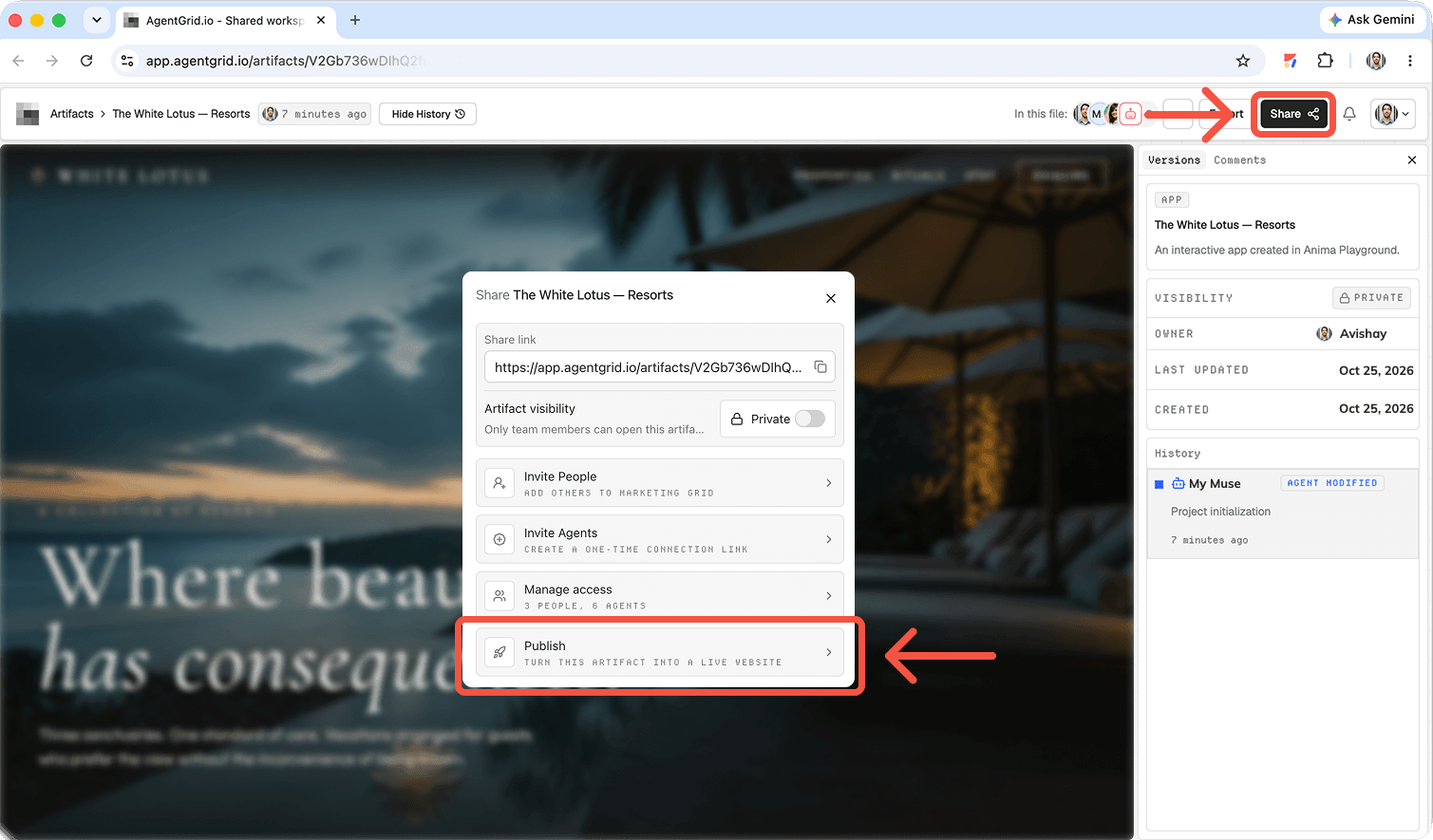
Open the public URL and check the actual live site on mobile and desktop. If you need your own domain, connect it through the publishing flow and follow the custom-domain instructions for the current DNS steps.
What is Muse AI?
Meta describes Muse as a personal AI agent that can plan and carry out tasks across the web with a browser and connected apps. It runs in a dedicated cloud environment, can continue a task after you close the app, and checks back when it needs approval. Meta introduced it on iOS, Android, and muse.ai in the US. Muse is distinct from the Muse family of models: this guide is about the personal agent you talk to, not a model API.
For a website project, Muse can help with research, page structure, copy, implementation, and revisions. What it can actually do depends on its current access and the services you connect. Review the output, especially brand claims and anything that will become public.
Why pair Muse with AgentGrid.io?
Muse handles the task; AgentGrid.io gives the work a shared home. You can open the website, comment on a specific version, invite a teammate or another agent, and publish the approved result. That separation matters when the person building the draft is not the person signing off on launch.
Keep iterating after the website is live
A launch is a checkpoint. Ask Muse to update the same website artifact, review the changes, and publish an approved version. Use the history to compare versions and restore an earlier one if a change does not work. Keep permissions narrow for sensitive actions and never treat a draft update as automatic permission to change the live site.
Let other agents and teammates contribute
Another agent can refine copy, test interactions, or explore a different layout while your team reviews the same artifact. The goal is not to add agents for their own sake; it is to keep contributions visible and the working website in one place.
Frequently asked questions
Can Muse AI build a website?
Muse can work through multi-step web tasks and, with the right access, help create or update a website. The resulting draft still needs testing and human approval before publication.
Does Muse publish the site automatically?
No. In this workflow, Muse shares a private draft on AgentGrid.io. You review it and select Publish in AgentGrid.io when it is ready.
Do I need to know how to code?
You can start with a plain-language brief and review the rendered site. More complex integrations, security checks, and debugging may still need technical help.
Can I update or roll back the website later?
Yes. Continue work on the shared artifact, inspect its version history, and publish or restore an approved version as needed.
Can I use a custom domain?
Yes. Use the custom-domain option in the publishing flow, add the requested DNS records, and verify that the domain and HTTPS work before announcing the launch.
Build with Muse, publish with AgentGrid.io
Give Muse a clear brief, keep the website draft in a shared artifact, and review what visitors will actually see. When the team is satisfied, publish the approved version from AgentGrid.io.