Figma
Figma API
API Web to code extension
 Adobe XD
 Discord
 Twitter
 GitHub
'/%3E%3Cpath%20fill='%23b2b2b2'%20d='M241%20382q0%2016%2017%2026%2017%2011%2042%2011t42-11q16-11%2017-26V269H241'/%3E%3Cpath%20fill='%239f7e00'%20d='M241%20379q0%2014%208%2023%209%209%2021%209%2014%200%2021-9%209-9%209-23V269h-59'/%3E%3Cpath%20d='M241%20339v-70h59v110q0%2014-9%2023l-6%205v-68h-15v72q-8%200-14-4v-68zm59%2040c0%2022%2015%2032%2029%2032%2021%200%2030-18%2030-32v-40h-59'/%3E%3Cpath%20fill='%239f7e00'%20d='M266%20277v5h2v12h-3v-5h2v-5h-9v5h2v5h-4v9h3v18h-5v10h34v-10h-5v-18h3v-9h-4v-5h2v-5h-9v5h2v5h-3v-12h2v-5zm42%20101q0%2010%206%2017%206%206%2015%207%2010-1%2016-7%206-7%206-17v-29h-43'/%3E%3Ccircle%20fill='%230044ad'%20cx='329.5'%20cy='372'%20r='6'/%3E%3Cellipse%20fill='%230044ad'%20cx='300'%20cy='340'%20rx='16'%20ry='21'/%3E%3C/svg%3E)


'%3E%3Cpath%20stroke='%23000'%20stroke-width='4'%20d='m-35-37-13%2020m5%203%2013-20m5%203-13%2020m63%2042%206-9m1-2%206-9m5%203-6%209m-1%202-6%209m5%203%206-9m1-2%206-9m-96%200%2013%2020m5-3-6-9m-1-2-6-9m5-3%2013%2020m63-42-6-9m-1-2-6-9m5-3%2013%2020m5-3-6-9m-1-2-6-9'/%3E%3Ccircle%20r='24'%20fill='%23cd2e3a'/%3E%3Cpath%20fill='%230047a0'%20d='M0%200a12%2012%200%201%201%2020%2013%2024%2024%200%201%201-40-26A12%2012%200%201%200%200%200'/%3E%3C/g%3E%3C/svg%3E)


'%3E%3Ccircle%20r='92'/%3E%3Ccircle%20fill='%23fff'%20r='80'/%3E%3Ccircle%20r='16'/%3E%3Cg%20id='c'%3E%3Cg%20id='b'%3E%3Cpath%20id='a'%20d='m0-80%203%2048L0-8-3-32M21-77%2011-30%202-8%205-32M40-69%2019-26%204-7%2013-29'/%3E%3Cuse%20href='%23a'%20transform='scale(-1)'/%3E%3C/g%3E%3Cuse%20href='%23b'%20transform='rotate(45)'/%3E%3C/g%3E%3Cuse%20href='%23c'%20transform='rotate(90)'/%3E%3C/g%3E%3C/svg%3E)


'/%3E%3C/svg%3E)


'/%3E%3C/svg%3E)
'/%3E%3C/g%3E%3Cuse%20href='%23b'%20transform='rotate(45%20140%20300)'/%3E%3Cpath%20d='m299%20285%2046%2015-46%2015%2028-39v48M59%20510l-36%2032%2010-47%2020%2043-42-24m22-409L23%2058l36%2032-48-4%2042-24'/%3E%3C/svg%3E)


'/%3E%3C/svg%3E)
 Blog
Blog
User flows: What they are and why they matter in UX design14 min read
Reading Time: 9 minutesGreat UX does not start with pixels. It starts with understanding what users are trying to do, where they enter a product, which decisions they need to make, and what path gets them to a successful outcome.
That path is called a user flow.
A user flow is a visual map of the steps a person takes through an app, website, or specific task. It can show a full product experience, like onboarding into a SaaS app, or a smaller flow, like signing up, booking a demo, subscribing to a newsletter, or completing checkout.
For UX designers, product teams, and founders, user flows are one of the simplest ways to design better interfaces before committing to detailed screens. They help you see where users might get confused, where a flow has too many steps, and which screens you actually need to design.
In this guide, we’ll explain what user flows are, how to read them, when to create them, and how they support better UX design.
Try designing user flows with AI
Describe the user flow you want to design, then let Anima turn it into UX, screens, and code.
What is a user flow?
A user flow is a diagram that shows the path a user takes to complete a goal inside a product. In UX design, that product is usually an app, website, web app, or digital service.
A user flow begins with an entry point, such as a homepage, landing page, search result, email link, login screen, or shopping cart. It ends with a final interaction, such as creating an account, completing a purchase, submitting a form, publishing a project, or reaching a confirmation page.
A user flow can represent:
- A full product journey, like discovering, signing up for, and using a new app
- A single task, like resetting a password or upgrading a plan
- A feature flow, like creating a project, inviting a teammate, or exporting a design
- A user interface flow, showing how screens connect inside the product
The goal is simple: make the user’s path clear before you design the interface in detail.

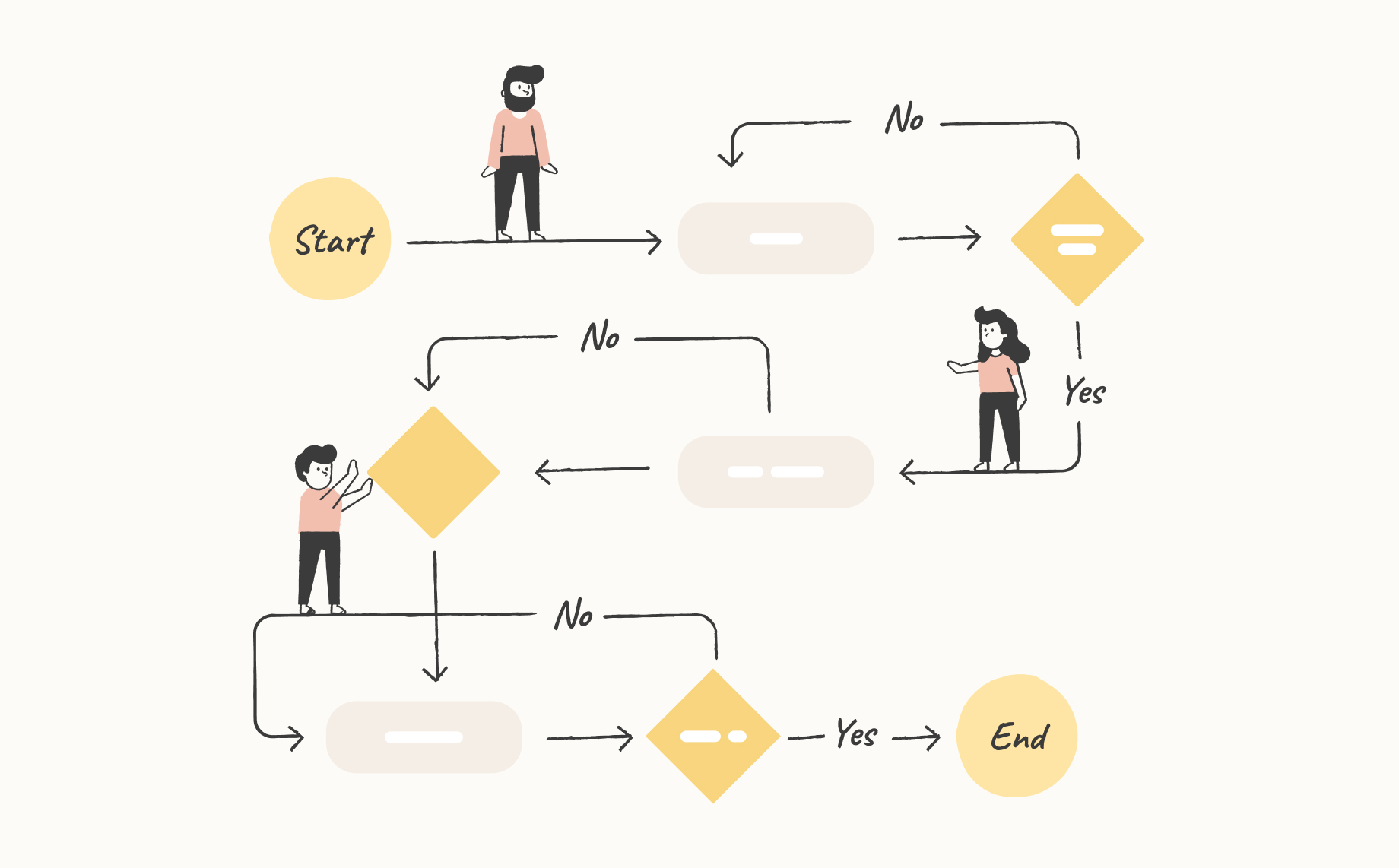
An example of a basic user flow structure
User flow vs user interface flow
The terms user flow and user interface flow are closely related.
A user flow focuses on the user’s path toward a goal. It answers questions like:
- Where does the user start?
- What action are they trying to complete?
- What decisions do they make along the way?
- What happens if they succeed, fail, or take a different route?
A user interface flow focuses more specifically on how screens, states, buttons, forms, and interface elements connect. It answers questions like:
- Which screen comes after this one?
- What happens when the user clicks this button?
- Where does this error state lead?
- What does the user see after submitting the form?
In practice, UX teams often use both together. The user flow defines the path. The user interface flow makes that path concrete inside the product UI.
How to read a user flow
A user flow lays out the steps a user takes from the entry point to the final interaction. Each step is usually represented by a shape, also called a node. The nodes are connected by arrows that show the direction of movement.
Most user flow diagrams use a simple visual language:
- Circle or oval: Start or end point
- Rectangle: Screen, page, or action
- Diamond: Decision point, such as yes/no, success/failure, or choose path
- Arrow: Direction of movement between steps

User flow components explained
For example, a simple signup user flow might look like this:
- User lands on homepage
- User clicks “Start free”
- User enters email and password
- System checks whether the email is valid
- User confirms account
- User reaches onboarding screen
- User completes setup
- User lands in dashboard
This kind of user flow example helps the team understand the experience before designing every screen.
User flow examples
User flows become easier to understand when you connect them to real product tasks. Here are a few common user flow examples UX teams create during product planning.
Signup user flow
A signup user flow maps how a new visitor becomes a registered user.
- Visit landing page
- Click signup CTA
- Choose signup method
- Enter account details
- Verify email
- Complete onboarding
- Reach product dashboard
This flow helps teams reduce friction in the first experience. If signup has too many steps, unclear form fields, or confusing verification states, users may drop off before they ever see the product.
Checkout user flow
A checkout user flow maps how a user moves from product interest to purchase.
- View product or pricing page
- Add item or select plan
- Review cart or plan details
- Enter payment information
- Confirm purchase
- Reach success page or receipt
This flow is especially important for ecommerce, SaaS, and subscription products because every extra step can affect conversion.
Login and password reset user flow
A login flow maps how returning users access their account, including edge cases.
- Open login page
- Enter credentials
- System validates input
- User logs in successfully or sees an error
- If needed, user starts password reset
- User confirms email
- User sets new password
- User returns to product

An example of user flow for a login process (task flow)
Onboarding user flow
An onboarding user flow maps how new users reach their first successful product moment.
- Create account
- Answer setup questions
- Choose template or starting point
- Complete first action
- See success state
- Continue into the product
For AI products, design tools, and productivity apps, onboarding flows are critical because users need to understand what to do next quickly.
When to create a user flow
Create user flows early in the design process, ideally after initial user research and before high-fidelity UI design.
At this stage, a user flow helps you:
- Decide which screens need to exist
- Remove unnecessary steps
- Identify confusing decision points
- Align the team around the product structure
- Plan prototypes faster
- Avoid designing polished screens for a broken path
User flows are also useful later in the product lifecycle. If an existing interface is underperforming, a user flow can help you diagnose where people are dropping off, looping, or failing to complete key tasks.
In other words, user flows are not only for new products. They are also useful for improving existing products.
The role of user flows in UX design
User flows are a core part of UX design because they connect user goals to product structure. Before you worry about spacing, typography, visual hierarchy, or components, you need to know what the user is trying to accomplish and how the product helps them get there.
User flows help UX teams do three important things.
1. Create a more intuitive interface
A clear user flow makes the final interface easier to understand.
When you map the flow before designing, you can spot friction early. Maybe a user has to make a decision before they have enough information. Maybe a form appears too soon. Maybe the confirmation step is missing. Maybe there are three screens where one would be enough.
If the flow is confusing, the interface will probably be confusing too.
2. Evaluate an existing interface
User flows are a great way to optimize existing products that may not be converting or retaining as expected. If users are not converting, activating, or completing an important task, map the current flow.
You may find that users are being sent to the wrong screen, asked for too much information, or forced through a path that does not match their intent.
3. Convey your strategy to team members and stakeholders
User flows are great for collaboration. They give designers, developers, PMs, decision makers, and stakeholders a shared map of the experience.
Designers can use the flow to plan screens. Developers can use it to understand states and edge cases. PMs can use it to clarify requirements. Stakeholders can use it to review the logic of the experience before the team invests in detailed design or implementation.
User flows can also help developers understand the overall structure behind your final prototype, which makes handoff more efficient.
User journey vs user flow
User journeys and user flows are often confused, but they are not the same thing.
A user journey tells the broader story of a user’s relationship with a product. It usually includes user goals, emotions, motivations, pain points, and touchpoints before, during, and after product use.
A user flow focuses on the path a user takes inside the product to complete a specific goal.
Key differences
| User journey | User flow |
|---|---|
| Focuses on the user’s broader experience | Focuses on steps inside the product |
| Includes thoughts, feelings, motivations, and pain points | Shows actions, screens, decisions, and outcomes |
| Often starts before the user enters the product | Starts at a product entry point |
| Can continue after the task is complete | Ends when the user reaches the final interaction |
| Often tied to a persona or customer segment | Usually maps a task or product path |
Both are useful. The journey helps you understand the user’s context. The flow helps you design the actual path through the interface.
How to create a user flow
You can create a user flow with a whiteboard, design tool, diagramming tool, or AI design tool. The format matters less than the clarity of the path.
1. Define the user goal
Start with the action the user wants to complete.
- Create an account
- Buy a product
- Book a demo
- Publish a website
- Invite a teammate
- Export a design to code
A user flow should be built around a specific goal, not a vague product area.
2. Choose the entry point
Decide where the user starts. Examples include a homepage, pricing page, search result, email campaign, app dashboard, notification, or shared link.
Different entry points can create different flows. A returning user and a first-time visitor may not need the same path.
3. Map the happy path
The happy path is the simplest successful route from start to finish.
- User opens pricing page
- User selects plan
- User creates account
- User enters payment details
- User confirms purchase
- User lands on success page
This gives you the baseline experience.
4. Add decisions and edge cases
Real users do not always follow the perfect path. Add decision points such as:
- Does the user already have an account?
- Is the form valid?
- Did payment succeed?
- Did the user choose monthly or annual billing?
- Does the user have permission to continue?
- What happens if the user cancels?
These branches are what turn a simple path into a real UX design user flow.
5. Simplify the flow
Once the flow is mapped, look for friction.
- Can we remove a step?
- Can we combine screens?
- Are we asking for information too early?
- Is the next action obvious?
- Is there a dead end?
- Are error states clear?
- Does the user always know what happened?
The best user flows feel obvious because the complexity has already been resolved behind the scenes.
User flows in a nutshell
User flows are structural maps for product design. They show how users move through an app, website, or task from entry point to final interaction.
A strong user flow:
- Starts with a clear user goal
- Shows the user’s entry point
- Maps the steps, screens, and decisions in the path
- Includes important edge cases
- Helps teams identify friction before detailed UI design
- Makes handoff easier for designers, developers, PMs, and stakeholders
For UX teams, user flows are one of the most practical tools for turning user research into interface structure. They help you design with intent instead of guessing screen by screen.
FAQ: User flows
What are user flows?
User flows are diagrams that show the path a user takes through an app, website, or product task. They usually begin at an entry point, such as a homepage or login screen, and end when the user completes a goal, such as signing up, purchasing, or submitting a form.
What is a user flow in UX design?
In UX design, a user flow maps the steps, screens, decisions, and actions a user takes to complete a goal. UX teams use user flows to plan product structure, reduce friction, and design clearer interfaces before creating high-fidelity screens.
What is the difference between a user flow and a user journey?
A user journey shows the broader experience, including user motivations, emotions, pain points, and touchpoints. A user flow focuses on the specific path a user takes inside the product to complete a task.
What is a user interface flow?
A user interface flow shows how screens, UI states, buttons, forms, and interactions connect inside a product. It is closely related to a user flow, but it focuses more specifically on the interface-level path.
When should you create a user flow?
Create a user flow after initial user research and before detailed UI design. You can also create user flows later to audit an existing product, diagnose drop-off, or improve conversion.
What are examples of user flows?
Common user flow examples include signup flows, checkout flows, onboarding flows, login flows, password reset flows, booking flows, upgrade flows, and invite-a-teammate flows.
Why are user flows important?
User flows help teams understand how users move through a product before investing in detailed design or development. They reveal friction, missing steps, confusing decisions, and unnecessary complexity early in the process.
How do you make a user flow?
Start with a user goal, choose the entry point, map the happy path, add decisions and edge cases, then simplify the path. Use circles or ovals for start and end points, rectangles for screens or actions, diamonds for decisions, and arrows to show direction.
Try Anima Playground for user flows and UX design
Anima Playground lets you go from product idea to UX flow, design, and working code in the browser. Describe the experience you want to build, refine it with AI, and turn the result into a real interactive product.