 Figma
 API
 Web to code extension
 Adobe XD
 Discord
 Twitter
 GitHub


 Blog


OpenAI Dots: How to Publish a Website11 min read
Reading Time: 7 minutesOpenAI dots are always-on agents in ChatGPT, not website hosts. Your dot can plan a site, gather context, coordinate coding work, and follow through between conversations. Publishing still requires a real destination, such as ChatGPT Sites or an AgentGrid.io app artifact. The important decision is where the draft lives and who approves the final public version.
Keep your website draft on AgentGrid.io
How to publish a website with OpenAI Dots and AgentGrid.io
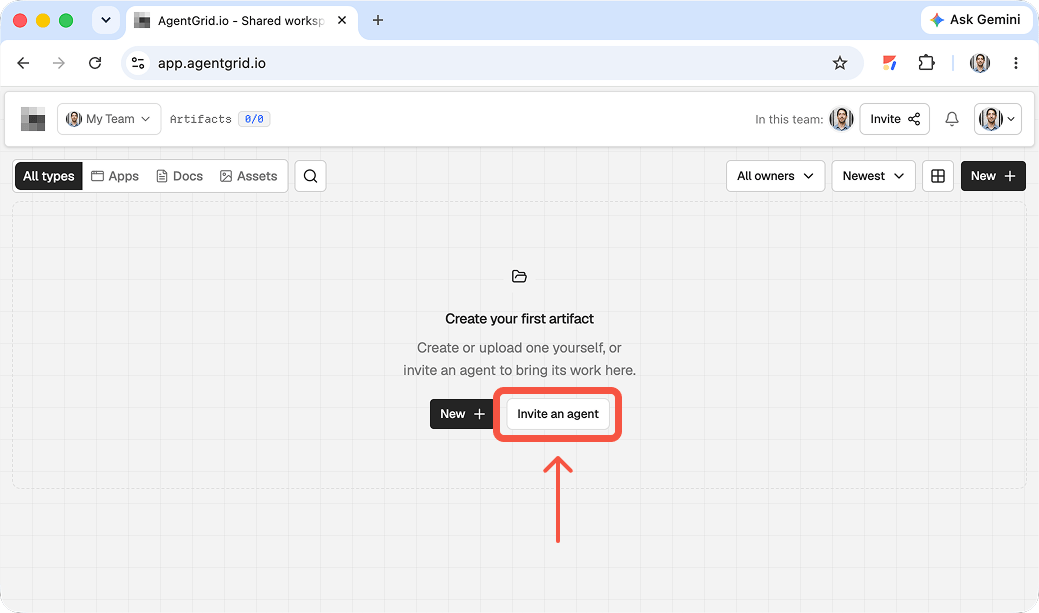
1. Give your Dot a scoped AgentGrid.io connection
Dots work through ChatGPT’s plugin ecosystem, but a Dot’s cloud computer is not the same thing as an authorized AgentGrid.io connection. Check ChatGPT’s Plugins tab for the official AgentGrid.io integration (on mobile, Dot profile > Customize > Plugins). If offered, connect it and approve the intended workspace and capabilities; availability varies by account. Give the Dot read and write access for the draft, and keep publishing as a separate approval decision. Set a rule that it must stop for your review before anything goes live. If the integration is unavailable on your account, prepare the site in the Dot and manually import its source into AgentGrid.io instead; do not assume a browser session grants API access.
2. Ask the Dot for a reviewable website, not a launch
Give the Dot a bounded brief: audience, pages, visual direction, source material, and what it should not invent. If the AgentGrid.io plugin is available and connected, ask the Dot to save the working draft as an app in the approved workspace and return the artifact link without publishing. Otherwise have it provide a source folder or ZIP for your manual import. For example: “Build a two-page site for this event from the approved brief. Put the working draft on AgentGrid.io, flag any missing facts, and wait for my review before publishing.” Open the returned artifact and inspect its rendering. If you are using manual import, upload the source folder or ZIP as a new app artifact and verify its entry point and assets.
3. Inspect both the site and the Dot’s decisions
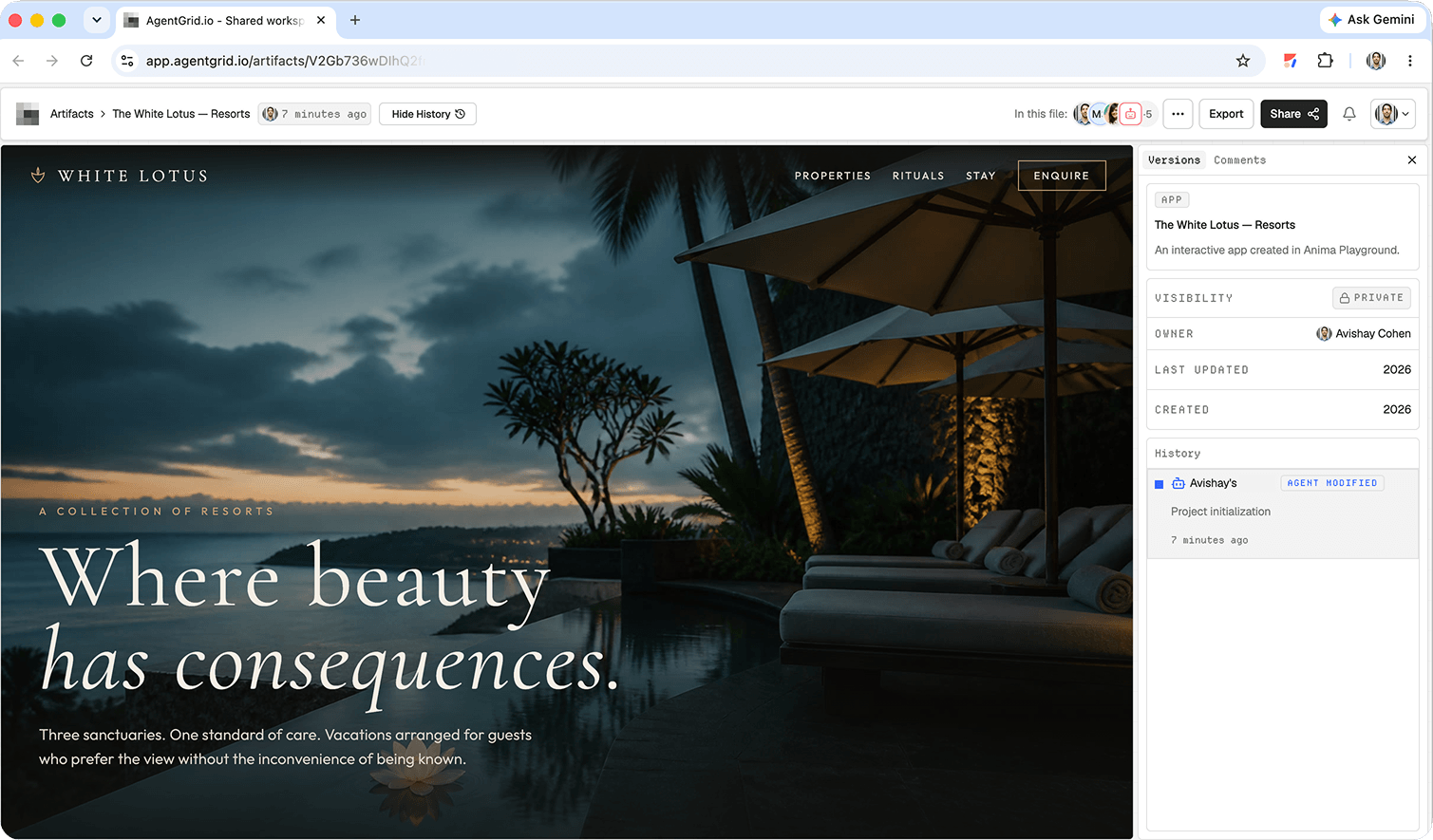
A Dot may continue work in the cloud while you are away, so make the handoff explicit: ask for a summary of what it changed, open the AgentGrid.io artifact, and inspect the actual version in History. Review links, mobile layout, claims, imagery, and any external integrations. Leave anchored comments on the draft and request changes to the same artifact, rather than accepting a fresh file in chat. Teammates need access to its workspace to open the private link; forwarding the URL alone does not make the site public. Check the Dot’s activity and approvals separately if it used other connected services.
4. Publish only after human sign-off
Open the artifact’s publish control and confirm deployment after the site and its sources are approved. Verify the public URL in a fresh browser session, including a mobile-sized view and critical actions. A Dot’s ongoing task or scheduled follow-up should not silently update the live website: later changes to the artifact remain unpublished until an authorized publish action. If further edits are needed, review the revised draft and explicitly publish the next version. Unpublish can remove public access without erasing the workspace artifact or its history.
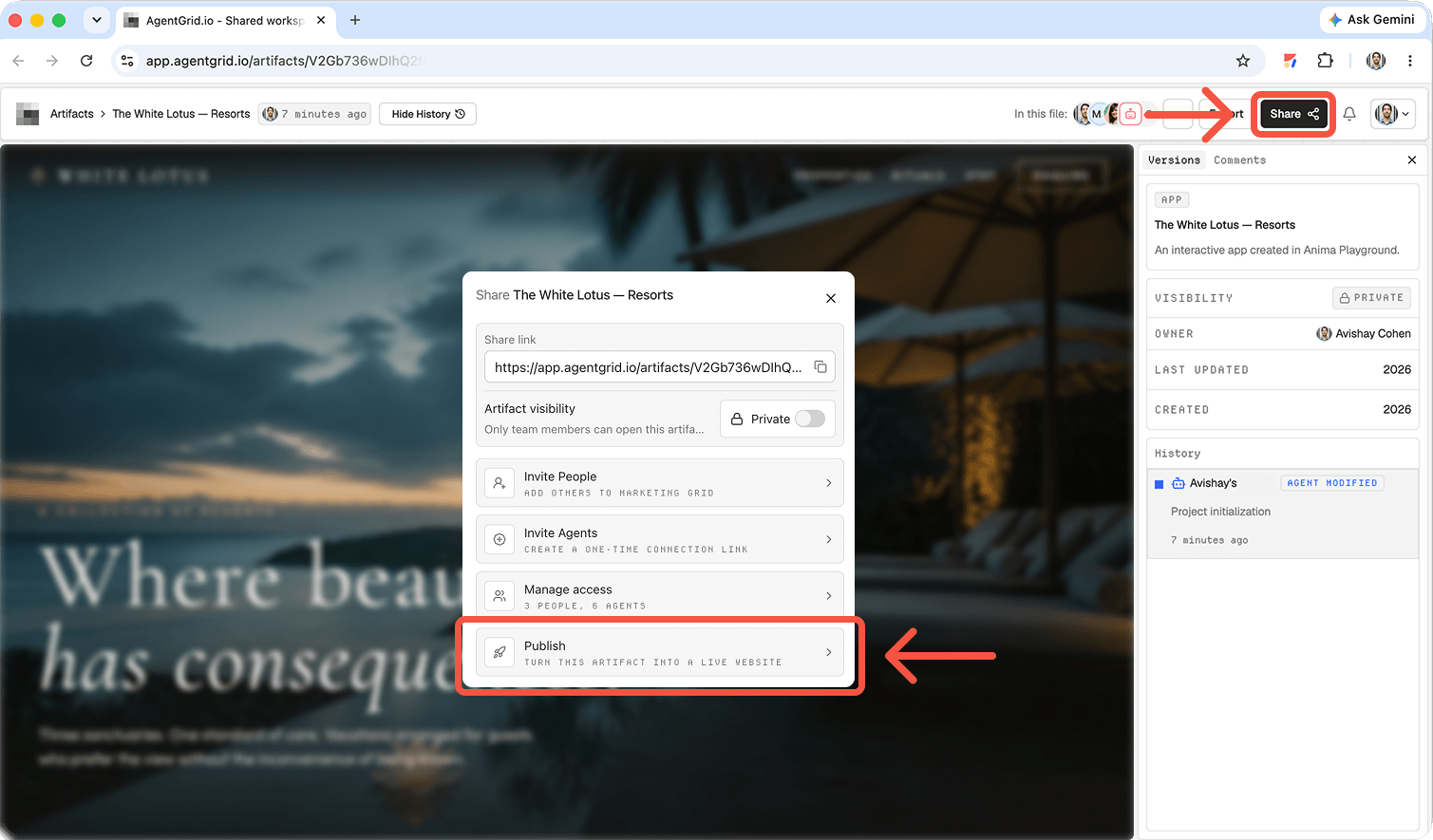
How to publish a website with an OpenAI dot
1. Check access and set the goal
Create your dot in the ChatGPT desktop app or desktop web if your account is eligible. Mobile app setup is supported, but mobile web is not. Dots are rolling out, and workspace admins can limit their tools. Describe the site, visitors, brand, deadlines, and what the dot must ask before doing. Say explicitly that it should prepare a reviewable draft before publishing anything.
2. Confirm the tools the dot can actually use
Check its connected apps and approved actions. A supported ChatGPT plugin may be available to a dot, but a plugin listing does not prove that the dot has access to your AgentGrid.io workspace or permission to create and edit artifacts. Check whether the AgentGrid plugin appears among its available connections and whether its approved identity reaches the right workspace. If not, use a manual handoff. Do not describe an unverified native dot integration as a working path.
The dot has separate browser sign-in sessions. Use its approval flow rather than sending passwords in chat.
3. Request a concrete review milestone
Break the task into source facts, copy, pages, functional behavior, and deployment. Ask where the actual project lives. Open the rendered result on desktop and mobile. Check navigation, forms, image rights, address, and hours.
A dot can create tasks in Codex cloud environments, but the environment must exist first. Such tasks have their own usage limits. A dot starting a Codex task does not mean Sites or AgentGrid has received the project. Require a link to the reviewed version and confirm the artifact or project really exists.
4. Choose the publishing route
ChatGPT Sites: Use an eligible ChatGPT Work or desktop flow to create the website, review the preview, save a version, then deploy it. Ask the dot to hand off its approved brief or project and check that those changes actually appear in Sites. Every deployment URL is production. Sharing settings and public access depend on your plan, region, and workspace permissions.
AgentGrid.io: Create an app artifact in your approved workspace, with a connected capable agent or supported manual import. If your dot can use the AgentGrid plugin with the necessary permissions, ask it to update that exact artifact and return the link. If it cannot, pass the reviewed brief to an agent or person who can. Keep the artifact private for review; publishing is a separate permissioned step.
Give the dot a publishing brief, not a blank check
A dot is useful when the website spans several tasks: collecting approved copy, coordinating a code change, getting stakeholder feedback, and returning to the unfinished work. Write the assignment in terms of deliverables and decision gates. For example: “Prepare a two-page site for our repair shop. Use only the pricing sheet I attach. Give me the project or artifact link, a list of missing facts, and a mobile preview. Do not publish or change a production domain until I approve the exact version.” Ask the dot to identify where each deliverable lives; a summary in the dot conversation is not the project itself.
OpenAI’s dot setup guide describes separate cloud-browser sign-in sessions and how to review tasks, files, and pending decisions. If a dot cannot open a connected service, verify its plugin and account permissions rather than repeatedly asking it to retry. Connecting a computer to Codex or enabling Work Sync does not automatically give the dot access to your local files; local access needs its own setup.
Which website publishing path should a dot coordinate?
ChatGPT Sites: ask the dot to prepare a brief or compatible project, then verify the actual Site in ChatGPT Work or desktop. The Sites workflow includes a preview, saved version, deployment, and audience controls. Do not treat a dot’s task completion as proof of a deployed Site.
Existing repository and host: let the dot scope a Codex task, then review the resulting code and a hosting-service preview. Keep the repository and deployment target explicit. If your team uses a release gate, the dot can collect checks and hand off for approval instead of gaining production permissions.
AgentGrid.io: use a workspace artifact when several people and agents need to inspect and revise one shared version. Check the dot’s plugin permissions and the workspace grants separately. A private artifact URL lets authorized teammates find the work, but does not give a stranger access or create a public website. The AgentGrid publishing guide distinguishes a public deployment from artifact sharing.
Why the artifact matters more than the conversation
A dot may remember project preferences, but its private conversations are not a shared source of truth. AgentGrid.io gives authorized humans and agents one versioned place to review the work. Conversation memory, app permission, and workspace access remain distinct. This is the review-first pattern in our Muse publishing guide, adapted for a dot’s ongoing work.
For setup details, see our OpenAI dots guide. The Claude Design publishing guide illustrates another design-to-website handoff. If two assistants are involved, transferring ChatGPT context to Claude is not the same as transferring a live site project.
Final review before the site goes public
Ask for unresolved facts, broken routes, unfinished interactions, and the intended audience setting. Open the eventual public URL as a visitor. Look for confidential material, unsupported promises, and images you cannot legally use. Retain a previous version for corrections.
Keep approvals and evidence attached to the task
Ask the dot to report the version, tests, proposed audience, and remaining gaps. Review the site on desktop and mobile and inspect connected data or forms as a visitor. After approval, require the final URL and a visitor-side check. If anything differs from the approved preview, pause publication and return to the source project.
Plugin permission and site audience are different gates. OpenAI’s dots permission FAQ says plugin permissions can be shared with ChatGPT and Codex, but dot approval defaults still apply. This does not establish access to a specific AgentGrid workspace or replace human publication approval.
Frequently asked questions
Does the dot host the website?
No. The dot coordinates the work. Sites, AgentGrid.io, or another approved host supplies the actual publication destination.
Does connecting AgentGrid to ChatGPT automatically connect my dot?
Do not assume so. Check which plugins the dot can use, the actual team and workspace grants, and the actions allowed. Choose a manual handoff if those prerequisites are missing.
Where do I find a dot’s completed website work?
Open the dot task and inspect its results. If it delegated work, check the computer or cloud environment where it ran. Ask for the repository, Site, artifact, or deployment URL, then open it.
Can I let the dot publish without review?
Configure its permissions and approval requirements for your risk level. A prompt asking it not to publish is helpful, but it should not replace platform access controls or a visitor-side check.
Give the work a place to live
Let the dot handle follow-through, but keep the website draft visible to the team and the launch decision in human hands. A shared artifact makes the next round of revisions easier to inspect.