 Figma
 API
 Web to code extension
 Adobe XD
 Discord
 Twitter
 GitHub


 Blog

How to Build and Publish a Website with Paperclip Agents10 min read
Reading Time: 7 minutesPaperclip coordinates an AI website team; it is not the website’s public host. Use it to break down the brief, assign accountable work, collect QA evidence, and route approval. Then deploy the reviewed code through a hosting provider, or explicitly publish a suitable app artifact through AgentGrid.io. A task moving to Done is not a public deployment.
Consider a three-page product launch site with a homepage, feature page, and contact route. The designer, coder, QA agent, and marketing reviewer can work in parallel only when they share acceptance criteria and know which revision is being reviewed. This guide shows how to structure that handoff without treating agent orchestration as a magic one-click site builder.
How to publish a website with Paperclip and AgentGrid.io
Paperclip can organize agent work as assignments and track outputs as artifacts. AgentGrid.io can be the separate place where the resulting web page or document is inspected and, if approved, published. Do not collapse those roles: a Paperclip task or its artifact record is not automatically an AgentGrid artifact, and these products should not be described as having a native connection without a verified integration.
1. Create the destination workspace first
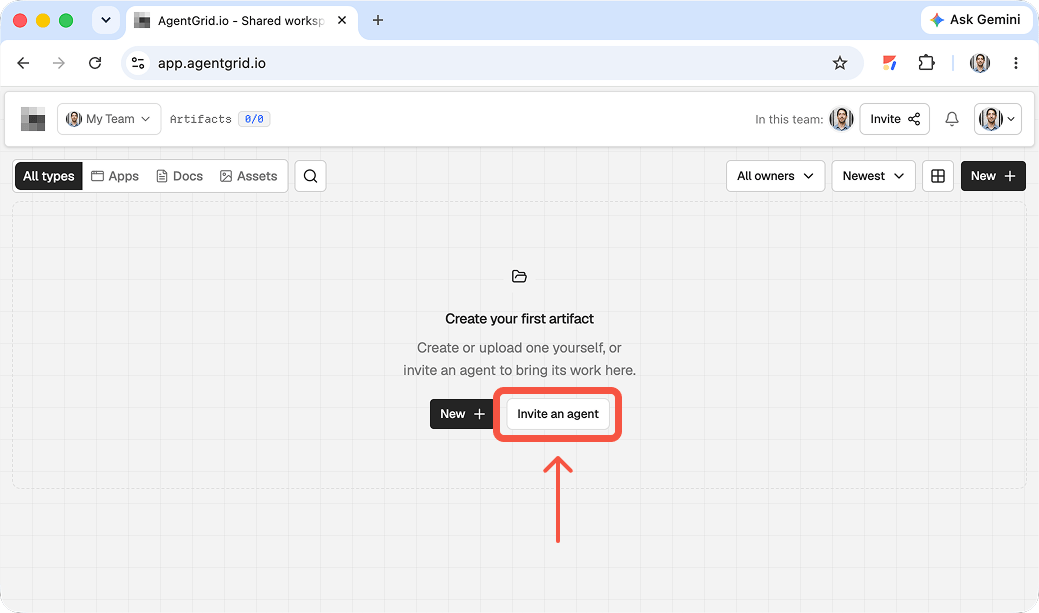
In AgentGrid, create or select a workspace for the team that will review the output. Check team membership before inviting anyone. You can keep Paperclip’s agent on its existing execution path and let a person transfer the deliverable. AgentGrid’s agent invitation is an optional route for a compatible, deliberately configured assistant, not evidence that Paperclip’s agent roster or approval chain will appear in AgentGrid. If you do invite an agent, use the AgentGrid invite instructions and untick unneeded Share and Publish capabilities before sending the one-time link.
In Paperclip, give the assignment a tight acceptance brief: a landing-page concept, required sections, source links for factual claims, and a named human reviewer. Keep the assignment’s internal status distinct from permission to publish. A task marked complete means the requested work was delivered for inspection, not that public release is authorized.
2. Transfer the actual output
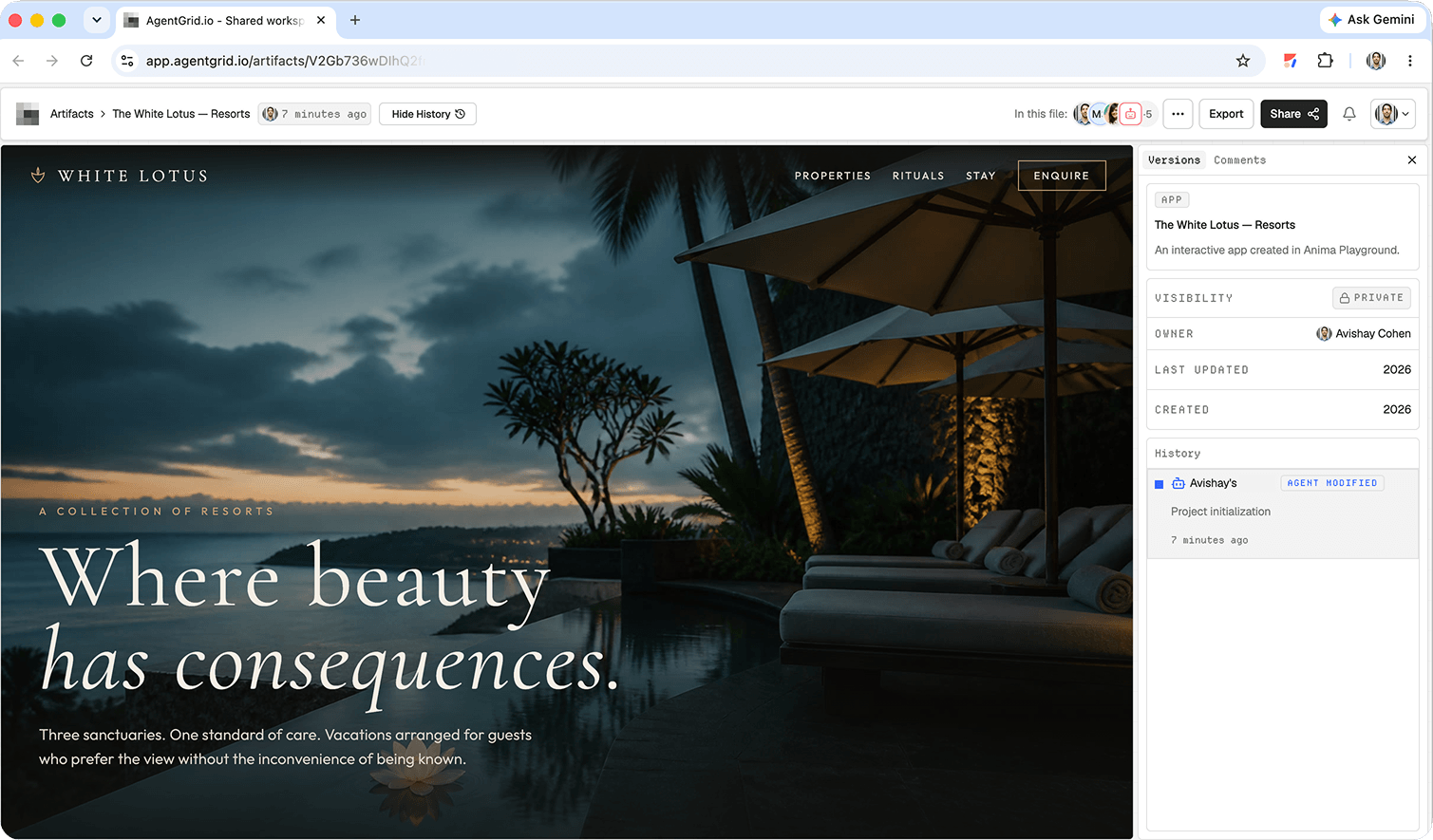
When the agent has finished, inspect the files or written artifact it produced. For a small site, package the relevant files as a ZIP and use AgentGrid’s ZIP import. For a text report, import the supported document or create a new document. Name it so reviewers can connect it to the Paperclip assignment, and include a short note on what is ready, what is provisional, and where the source materials live. Verify the AgentGrid preview rather than assuming the files rendered exactly as they did in the agent’s environment.
3. Separate task review from release review
Use Paperclip to track the assignment and its status. Ask the stakeholder to inspect the AgentGrid artifact itself and leave comments on content, links, accessibility, and any external-facing claims. AgentGrid supports artifact comments, so actionable feedback can refer to the thing that would be published. Incorporate revisions and check the new preview. If the task scope changes, update the Paperclip assignment as well, but do not treat approval in either tool as a magical sync to the other.
4. Publish the checked version
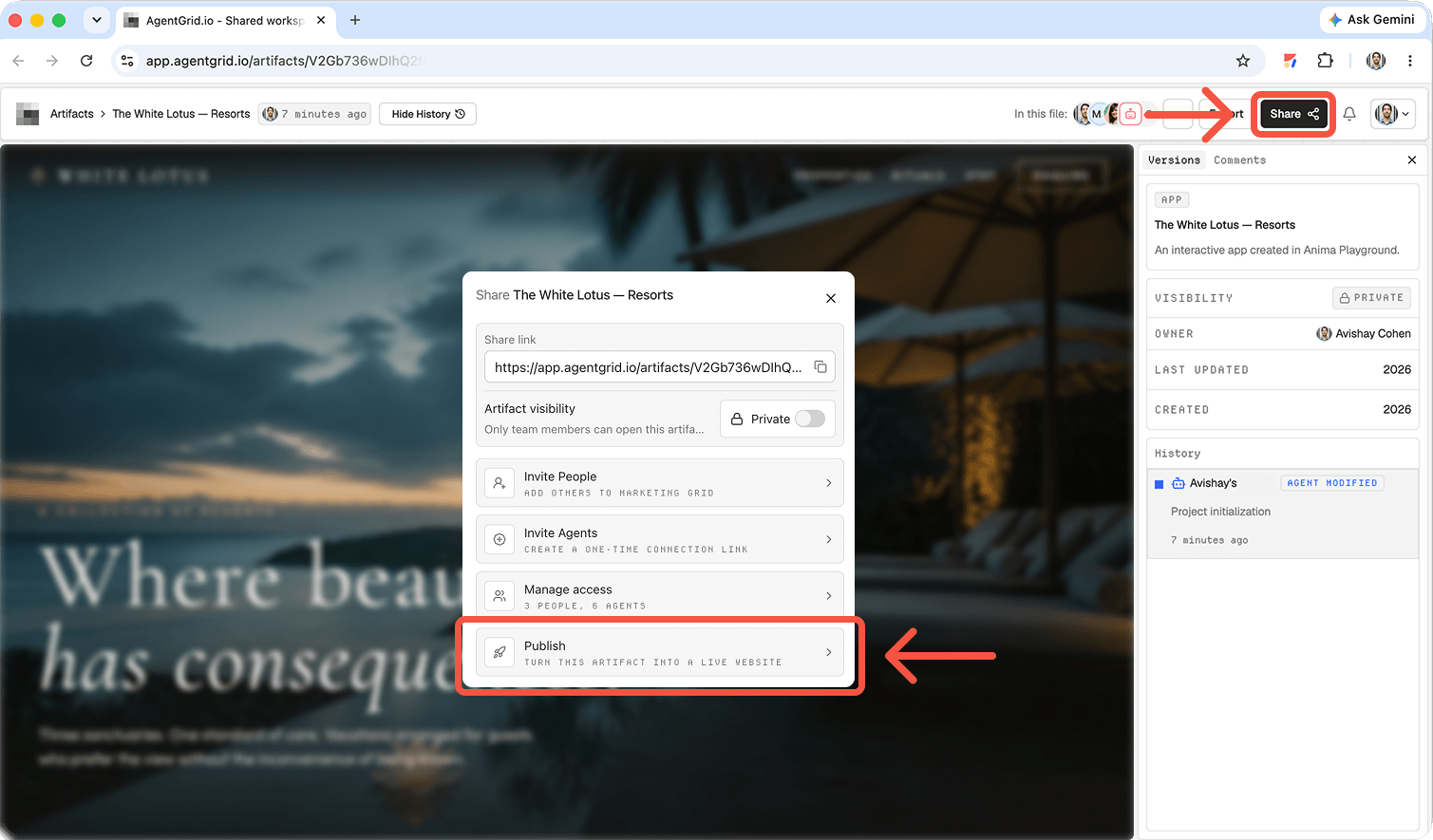
Only after a human owner authorizes public release, use AgentGrid’s publish flow. Open the resulting page as a visitor and compare it with the approved artifact. AgentGrid distinguishes the editable workspace artifact from the public deployment; subsequent changes require another publish action. Record the public URL back in the Paperclip task as a handoff note if your process calls for it, without claiming an automated integration or hidden approval bridge.
Give the team a website goal, not a vague instruction
Start with a narrow brief: audience, conversion goal, required pages, visual references, content owner, accessibility expectations, and the domain or hosting destination. For a first release, specify responsive layouts, metadata, a working contact route, and what is out of scope.
In Paperclip, create a project and goal, then break the work into owned tasks. Its task model supports a single accountable owner, blocking relationships, threads, and review stages. Assign a strategist or PM agent to plan, a designer to produce the visual direction, a coding agent to implement, a QA agent to test, and a human to approve launch. These are roles you configure, not a prepackaged website builder. Paperclip’s own website-team example shows feature pages, QA blocked by implementation, and a preview deployment moving through review.
Planning prompt: “Plan a three-page website for [audience] that helps visitors [goal]. Produce a sitemap, page-level acceptance criteria, content gaps, image requirements, and a task dependency map. Do not deploy anything. Assign each deliverable an owner and identify decisions a human must make.”
Define the release contract before assigning agents
Set the audience, primary conversion, approved copy, page inventory, visual assets, required breakpoints, target host, and launch owner. Include explicit non-goals, such as no payments or account creation in version one. Give every page a measurable acceptance criterion: the feature page explains the offer, the contact link reaches a working destination, and every route has a meaningful title.
Keep the source, design, and evidence together
Give the builder a repository or shared project location. The designer provides a layout specification and assets; the coder implements against the same brief. A task comment should link to the branch, pull request, preview, and test results. Paperclip can collect task-linked outputs and review evidence, but a task attachment is not automatically the live website or the canonical source repository.
Set boundaries before granting access. If an agent can push code through a GitHub identity in its shell, Paperclip’s per-tool Ask first controls do not govern those shell Git commands. Limit repository access and require branch protection and PR review on GitHub. For a deployment connector, distinguish reading build logs from starting a production deploy; Paperclip’s Netlify guidance recommends Ask first or Off for deploy and configuration changes. Keep credentials out of the website source and give each agent only the access its task requires.
Build prompt: “Implement the approved sitemap in [repository]. Preserve the agreed design, make navigation and forms functional, and add title and description metadata to every page. Work on a branch, run the project’s checks, attach the PR and preview URL to the Paperclip task, and stop before any production deployment.”
Separate issue status, source control, and publishing
Paperclip records who owns each issue and what evidence accompanies the handoff. Your repository still holds the implementation, and a hosting provider runs the deployed website. Link each issue to the exact branch, PR, preview, test log, and screenshots. If the task refers only to “latest,” reviewers can accidentally approve a preview that does not match the branch eventually deployed.
Make review a gate, not a message saying ‘looks done’
Ask QA to open the actual preview on desktop and mobile. Check the first-screen promise, keyboard navigation, alt text, broken links, form behavior, loading, console errors, and page metadata. Have marketing verify product claims and the CTA. Record reproducible evidence. If a form needs a backend, test submission end to end.
Paperclip’s execution policy can route an issue to a reviewer and then an approver when its executor tries to mark the task done. Requested changes return to the original executor. Use a human approval stage for public release and specify that approval of a task is not permission to publish until the reviewer has inspected the final preview and target domain.
QA prompt: “Test the preview against the acceptance criteria on a narrow mobile viewport and desktop. Return a table of pass, fail, evidence URL or screenshot, and reproduction steps. Do not approve or deploy; send failures back to the implementation owner.”
A practical acceptance checklist for launch
- Product: compare hero promise, pricing statements, and call-to-action destinations against approved copy.
- Function: click navigation, submit a test contact request, and inspect the success or failure path.
- Responsive design: review narrow screens, desktop, content overflow, image cropping, and readable spacing.
- Accessibility: check keyboard order, labels, alt text, semantic headings, and contrast.
- Search and reliability: confirm route-specific titles and descriptions, broken links, console errors, and production asset loading.
Deploy the approved build to an actual public URL
Choose the production destination before the last review. For a conventional codebase, connect the repository to a host such as Netlify or Vercel, check its build settings and environment variables, and let the host produce a preview first. After human approval, promote or deploy the reviewed revision using that host’s documented workflow. Open the production URL while logged out; test navigation, forms, certificate, domain, and deployed revision. Running Paperclip on a server only makes the orchestration app reachable; it does not publish the website.
If the website is a suitable HTML or React app artifact, AgentGrid.io can be the shared place where people and connected agents edit the same version. Import a project folder or ZIP, or have a connected agent create the artifact in the intended workspace. Review its rendered app and History there. An artifact link is private to people with workspace access; publishing is a separate, explicit action that creates a public URL. A connected agent needs publish capability and a human request to publish. Later edits stay off the public page until republished. Custom domains require an eligible paid plan and verified DNS. This is an alternative publishing route, not a claim that Paperclip automatically integrates with AgentGrid.io.
Launch prompt: “The human-approved revision is [commit or artifact version]. Deploy it to [specified host] or publish [specified AgentGrid.io artifact] only after explicit authorization. Return the public URL, deployed revision, build result, and a smoke-test checklist. If the target or permission is missing, stop and ask.”
Promotion should refer to a specific revision
Before release, record the approved commit or artifact version, the target host or workspace, the domain, and who can initiate publication. If the host generates preview URLs, inspect the final preview of that same revision before promoting it. Afterward, open the public URL without a privileged session and repeat the critical smoke tests. Save a rollback reference in case the contact route or assets break under production settings.
When should a team use each layer?
Paperclip: choose it when several agents need assigned issues, dependencies, reviews, and an accountable human launch owner. It tells the team what to do and tracks the work, rather than substituting for source control or a web host.
Repository and host: choose this path when the site needs an existing engineering release process, server features, infrastructure settings, or established rollback controls. The reviewed commit and deployment record should identify the live version.
Continue from the approved version
Paperclip owns assignments and review. Your repository and host own conventional production deployment. AgentGrid.io can hold a shared, versioned artifact and its deliberate publication. For a comparison of another agent-to-site workflow, see our Grok Bot publishing guide; for the handoff problem behind shared artifacts, read our AgentGrid.io introduction; and for a design-first path, see publishing a Claude Design website.
Ready to keep the approved website in one place? Create an AgentGrid.io artifact, invite the next collaborator with appropriate access, and publish only when the public version has passed review.