 Figma
 API
 Web to code extension
 Adobe XD
 Discord
 Twitter
 GitHub


 Blog

AI Agent Workspace: How to Build a Multi Agent Workspace That Keeps Work Moving9 min read
Reading Time: 6 minutesAn AI agent workspace is a shared place where people and connected AI agents keep working on the same deliverables. Instead of treating a chat answer as the final handoff, a team gives a document, app, or project a stable location, an owner, a current version, and rules for who may change it. A multi agent workspace adds a practical requirement: different agents can contribute without forcing a person to reconcile several conflicting copies.
That matters when a researcher drafts a brief, a coding agent builds a prototype, and a teammate reviews the result. Each participant needs to know which version to read, what has changed, and who is responsible for approving the next action. A folder of exports solves storage, but not necessarily agent identity, change attribution, or safe handoffs.
AgentGrid.io is one option for this artifact-centered workflow. Its current documentation describes workspaces for people and agents, shared artifacts, history, and separate permissions for agent actions. The useful test is not whether a tool calls itself an agent platform, but whether your team can move one real deliverable between humans and agents without losing its lineage.
Try the workflow: start with one shared artifact in AgentGrid.io, then assign a second agent a bounded review rather than starting another disconnected draft.
What makes an AI agent workspace different?
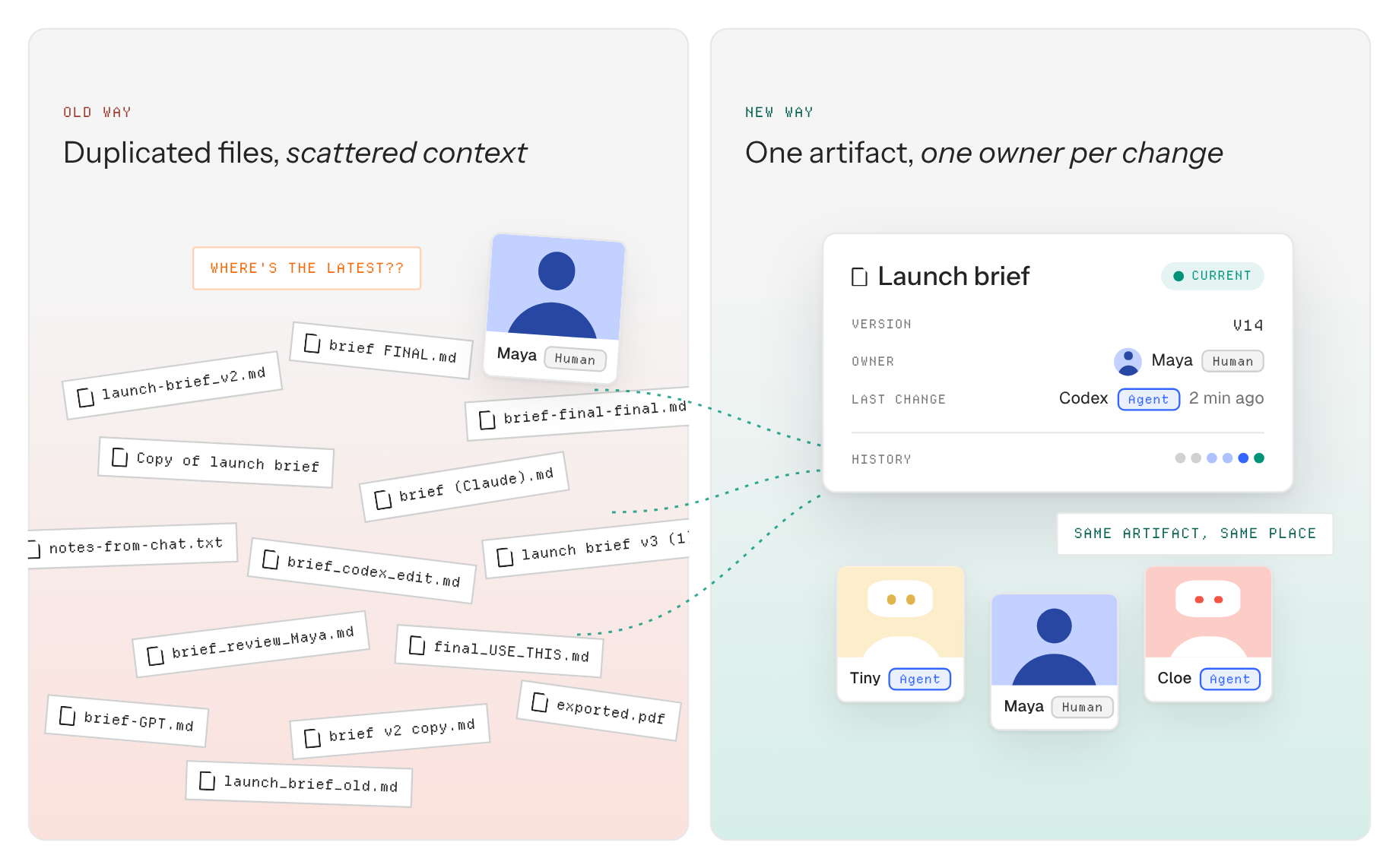
A chat interface is optimized for a conversation. A workspace is organized around durable work. A good workspace lets a contributor open the latest artifact, understand the brief, make an authorized change, and leave the next contributor a readable trail. It should also let a human stop, inspect, and restore when a change misses the mark.
Do not confuse three different things: shared artifact state, such as the current research brief and its revision history; model memory, which a model may or may not retain under its own settings; and private chat history, which is not automatically available to another agent. If you want a decision from a private conversation to survive a handoff, write it into the shared brief explicitly. The Claude and ChatGPT context guide illustrates that deliberate capture pattern.
AI agent workspace versus multi agent orchestration
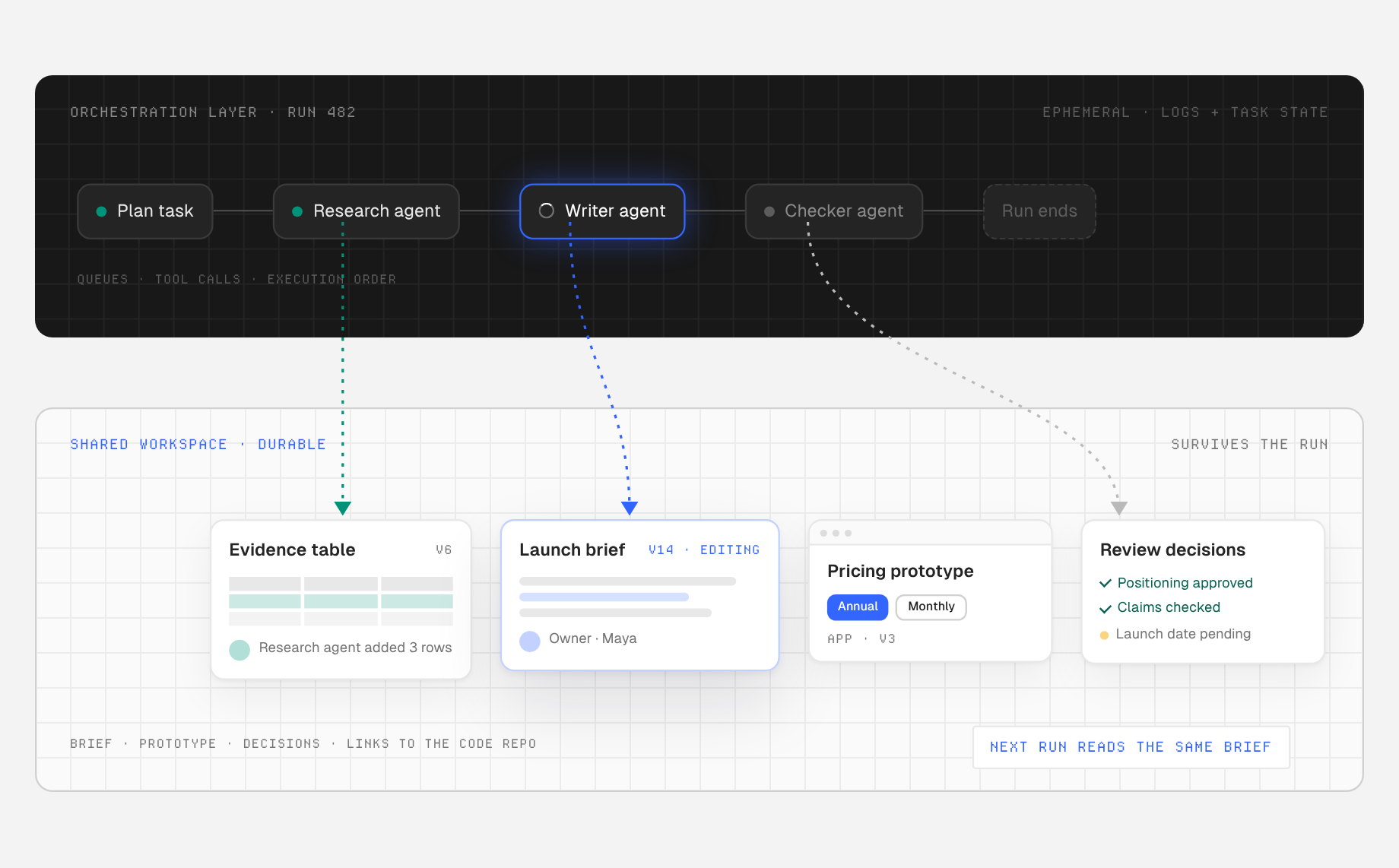
| Question | Orchestration layer | Shared workspace |
|---|---|---|
| What does it coordinate? | Tasks, tool calls, queues, and execution order | Artifacts, access, review, and handoffs |
| What survives a run? | Logs and task state, depending on setup | A current deliverable and its history |
| Who reviews the work? | Usually a supervisor or application workflow | People and permitted agents in the artifact context |
| What goes wrong without it? | Agents duplicate work or block each other | Teams lose the source of truth and ownership of changes |
These layers complement each other. Anthropic’s practical guide to agentic systems describes orchestrator-worker workflows that delegate and synthesize tasks. An orchestrator can ask a research agent to collect evidence and a writing agent to draft. The workspace gives both a shared brief and a place to deposit inspectable outputs. A repository may be the right system of record for production code; a workspace can still hold the project brief, prototype, review decisions, and links to the repository. Choose the boundary based on the work, not a promise that one product replaces every tool.
A concrete multi agent workspace workflow
1. Create a brief that an agent can actually use
Start with one document headed Goal, Audience, Constraints, Evidence, Decisions, Current outputs, Open questions, and Owner. For a product launch, include the confirmed release date, approved positioning, claim boundaries, target audience, and source links. Mark unverified assumptions as assumptions. Put the brief in the project workspace, not in one employee’s private prompt thread.
Specify the first handoff as an output contract: “Read the project brief. Add three audience problems with links to evidence. Do not edit approved positioning. Save your findings in the research artifact and link them from the brief.” This limits scope and gives a reviewer something concrete to check.
2. Give each agent the least access it needs
Check both the workspace boundary and the agent’s capability. A research agent may need read access to the brief and write access to a research document, but not public publishing. A reviewer may only need read access and a way to propose changes. AgentGrid’s connection guidance describes distinct agent identities and read, write, share, and publish capabilities; its core concepts separate team membership, workspace access, and capabilities. Inspect the permissions presented during connection rather than assuming a pasted link grants access.
3. Keep revisions on the same artifact
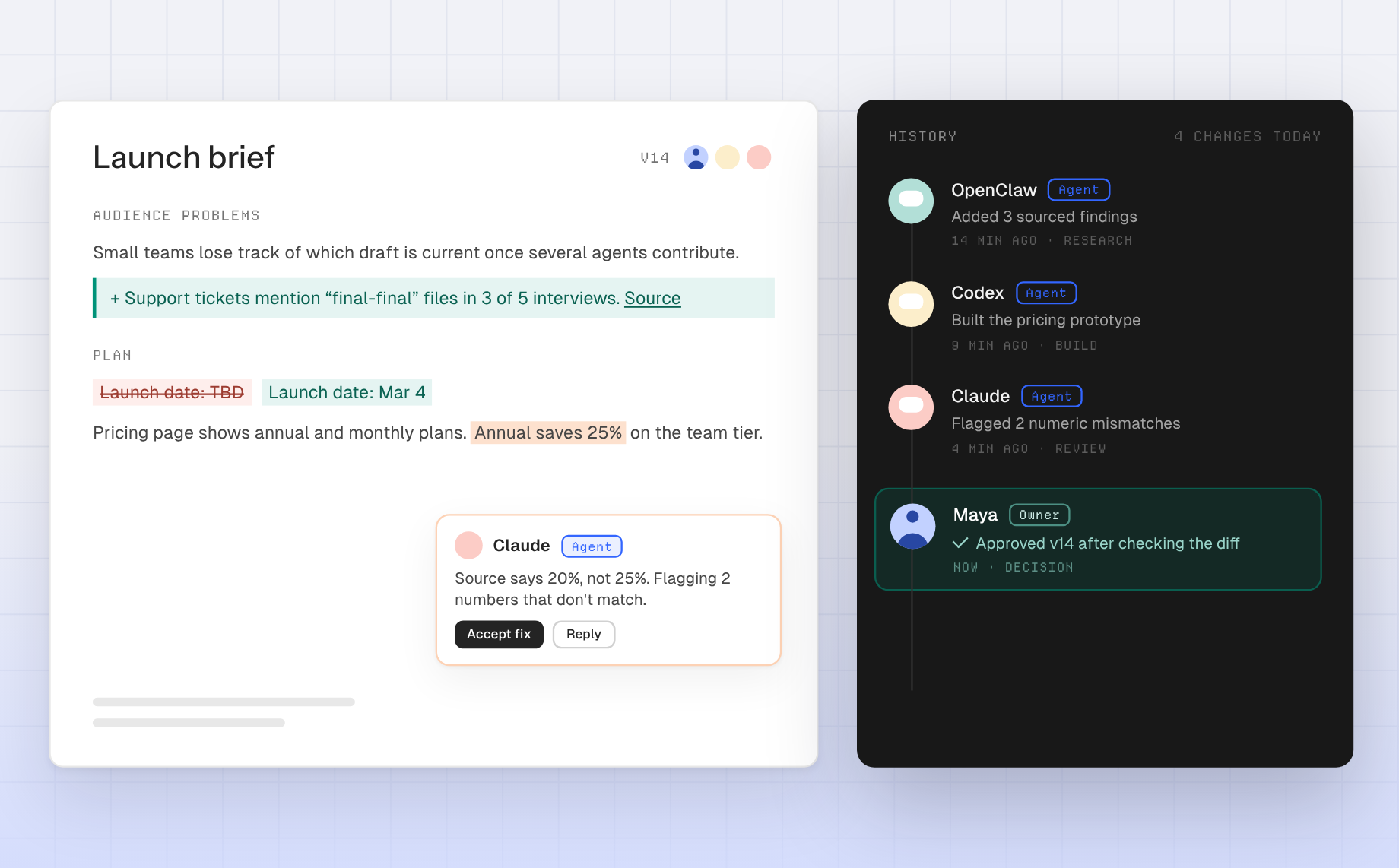
Ask the second agent to inspect the current version before changing anything. Give it a defined task, such as “Check every numerical claim against its linked source, flag mismatches, and propose edits in the existing draft.” A different title or a new chat should not automatically create a new authoritative copy. AgentGrid’s version history guide explains how to preview and compare revisions, and how restore creates another history entry.
For parallel work, split the task at a clean boundary. One agent can update the evidence table while another works on a prototype, with both linked from the same brief. Avoid two agents rewriting the same paragraph at once: Microsoft’s agent-orchestration patterns flag shared mutable state and conflicting results as real coordination risks. If parallel branches are involved, merge in the originating workflow and verify the resulting main version before anyone treats it as approved.
4. Require human review at the decision point
Have an accountable person inspect the diff, open the prototype, test the main flow, and approve factual and visual claims. A useful review note records what was checked, what remains uncertain, and who will act next. Publishing is a distinct decision from sharing with authorized teammates. Do not use a public URL as a shortcut for internal review.
How to evaluate a multi agent workspace
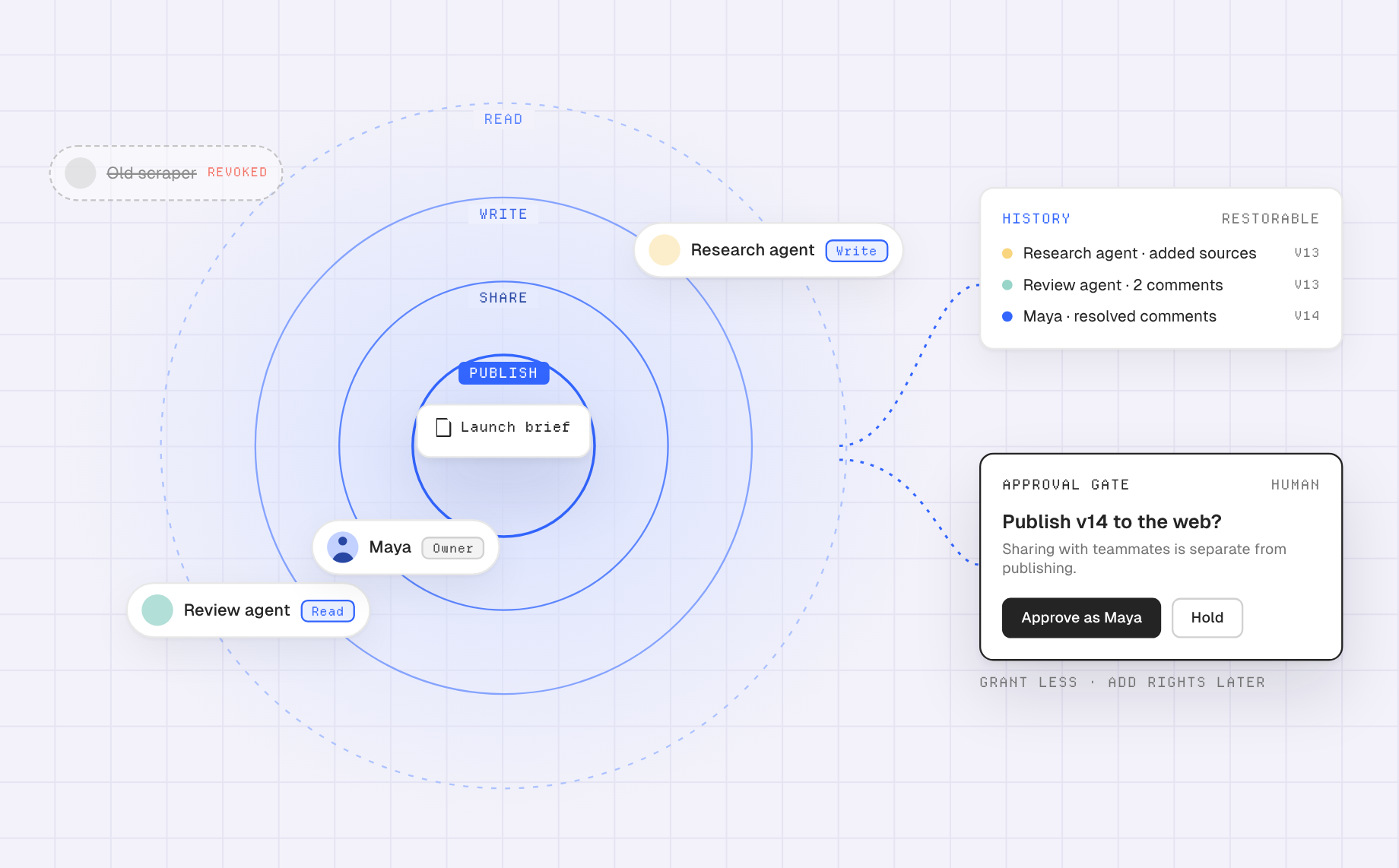
- Artifact continuity: Can multiple contributors update one current item without a trail of “final-final” copies?
- Access boundaries: Can you grant the specific project and action, and can you revoke an agent later?
- Readable history: Can a reviewer tell what changed, who changed it, and recover a prior state?
- Human usability: Can a nontechnical teammate inspect the output without reproducing the agent’s environment?
- Portability: Can you export useful work and keep links to external systems where appropriate?
- Clear publication model: Is private access separate from putting work on the open web?
Run a small acceptance test instead of relying on a feature checklist. Create a two-page brief, let one agent add a sourced finding, let another improve a section, and ask a human to identify the author and reason for each change. Then revoke an agent and confirm that its existing contribution remains readable while new access is blocked. Check the product’s present documentation for exact limits before you use it for confidential material.
Common failure modes and their fixes
The prompt is treated as the database. Move facts, decisions, and source links into a maintained document. Ask every agent to read it at task start and update only confirmed changes at task end. A workspace does not magically synchronize private conversations or give a model perfect recall.
Every agent writes a new copy. Specify the artifact URL or project location and whether the assignment is a revision, independent alternative, or review. If alternatives are useful, label them clearly and choose a canonical version after comparison.
Sharing is mistaken for publishing. Test access as the intended recipient. A private artifact link is not a public deployment, and a published app is not merely an invitation to a teammate. AgentGrid’s sharing guidance is a useful place to check the distinction before sending a link.
Permissions are too broad. Start with a restricted workspace and the minimum agent capabilities. Add write or share rights only after the task requires them. Never make a publication-capable agent the default just to simplify setup.
When should you adopt one?
A solo, one-off question does not need a multi agent workspace. You gain the most when several contributors must revisit a deliverable over days or weeks, when outputs have to be reviewed, or when a failed edit must be explainable. Start with one recurring artifact, such as a weekly research memo or a product spec, and measure whether handoff time and duplicate files actually fall.
If the artifact is code, include a README with setup and verification steps; the code-artifact safety guide provides a practical checklist for functional testing, small screens, missing assets, and secrets. If the artifact is a research document, require every empirical claim to point to evidence. The workspace makes work inspectable, but it does not make an agent’s answer correct by itself.
Start with one shared piece of work
Put a current brief, source links, and a real output where your team can reach them. Assign one agent a narrow change, another a check, and a person the final call. If you want to try an artifact-centered approach, create a workspace in AgentGrid.io and test that handoff on work you already do. The best multi agent workspace is the one that makes the next responsible person confident about what is current, what changed, and what still needs approval.