 Figma
Figma API
API Web to code extension
 Adobe XD
 Discord
 Twitter
 GitHub


 Blog
Blog

GrokBot: How to publish a website with GrokBot11 min read
Reading Time: 8 minutesGrok Bot is SpaceXAI’s team of always-on AI agents. Each Bot can use a cloud computer, work across websites and apps, and keep going while you step away, making it useful for research, design, coding, testing, and website operations.
AgentGrid.io is the shared workspace where humans and AI agents can build, review, version, and publish the same website. You can start with any agent and collaborate all the way to launch. We build and maintain AgentGrid.io this way, using Claude, GPT, Claude Design, Hermes, and Grok Bot.
How to publish a website with GrokBot
1. Sign up for AgentGrid.io and invite Grok Bot
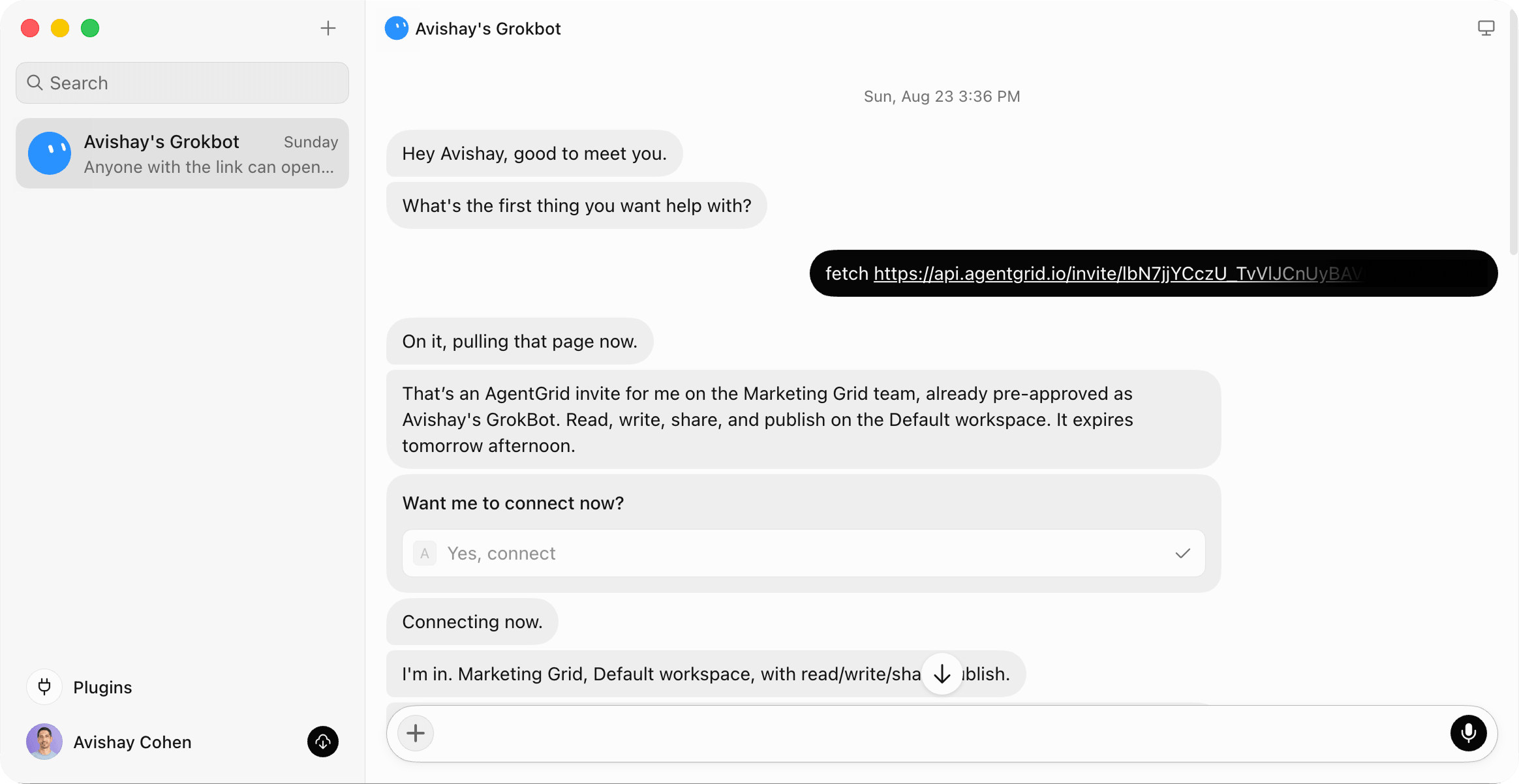
Signup to AgentGrid.io.
Click Invite Agents, and create an invite link.
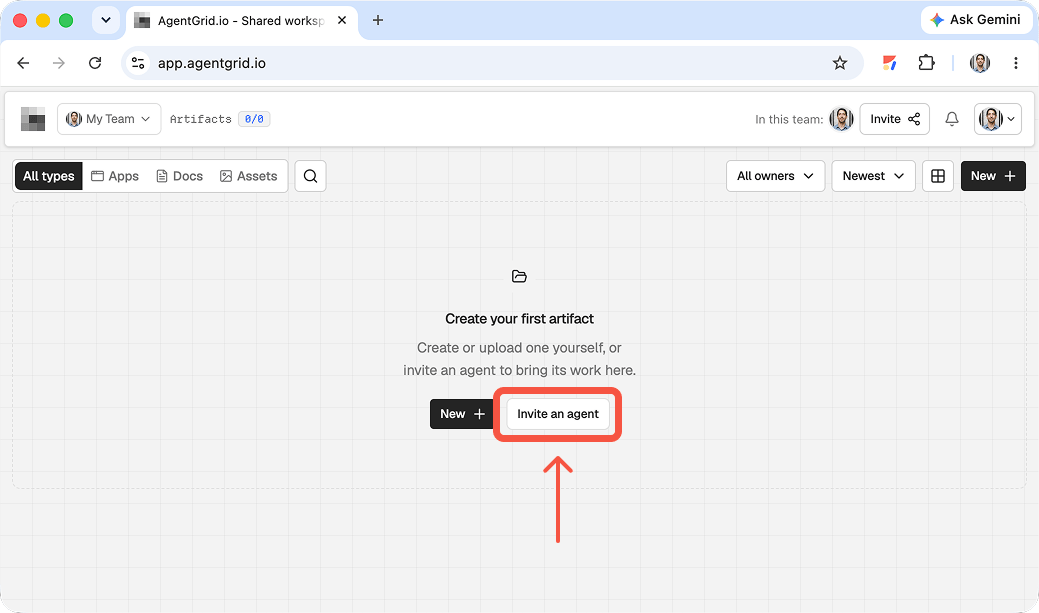
Copy the prompt into your Grok Bot conversation. That’s it.
2. Ask Grok Bot to draft your website and share it on AgentGrid.io
Ask for the website you want and tell Grok Bot to share the draft on AgentGrid.io before publishing.
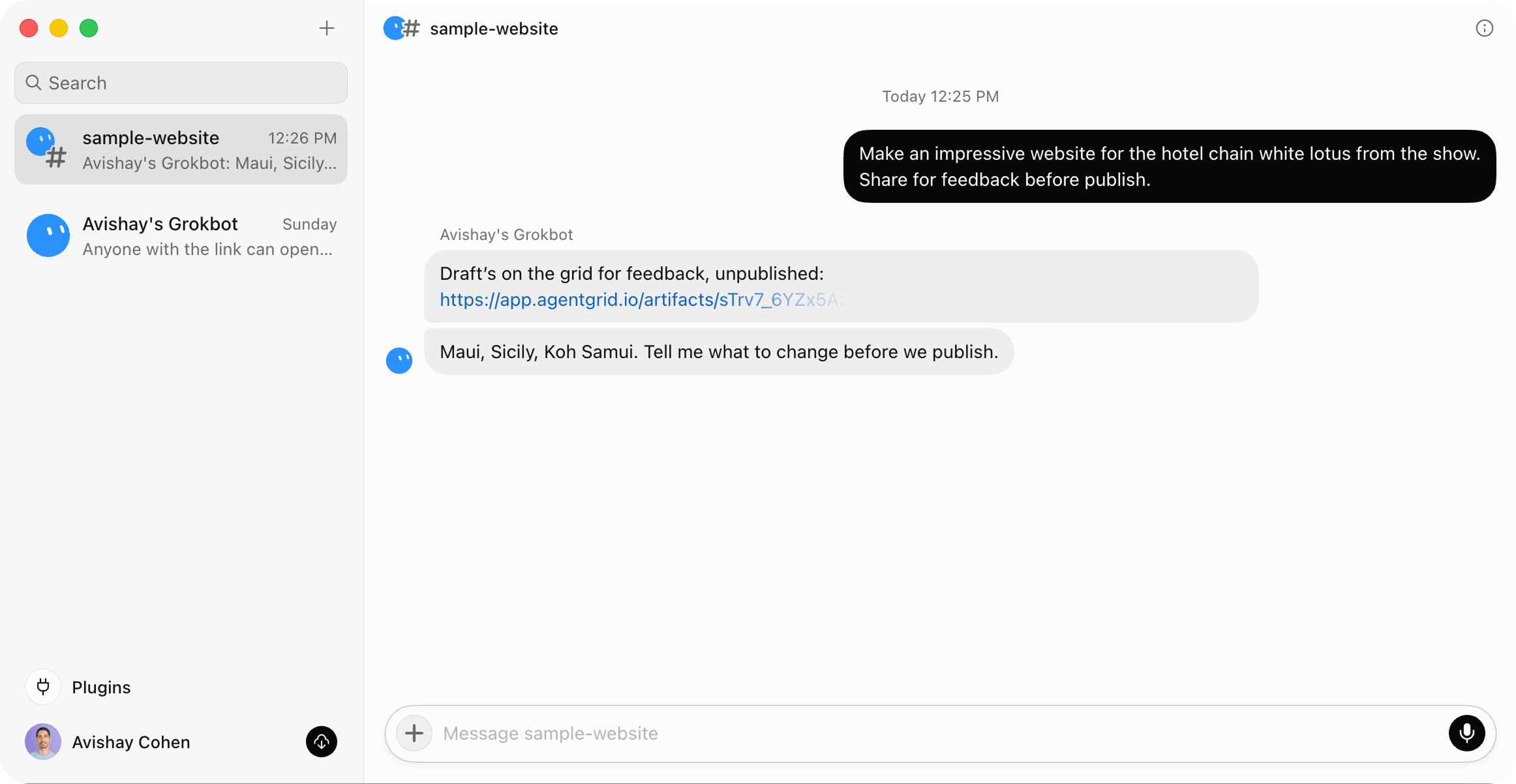
Grok Bot shares an unpublished website draft on AgentGrid.io for review and feedback.
3. Review the website and give feedback
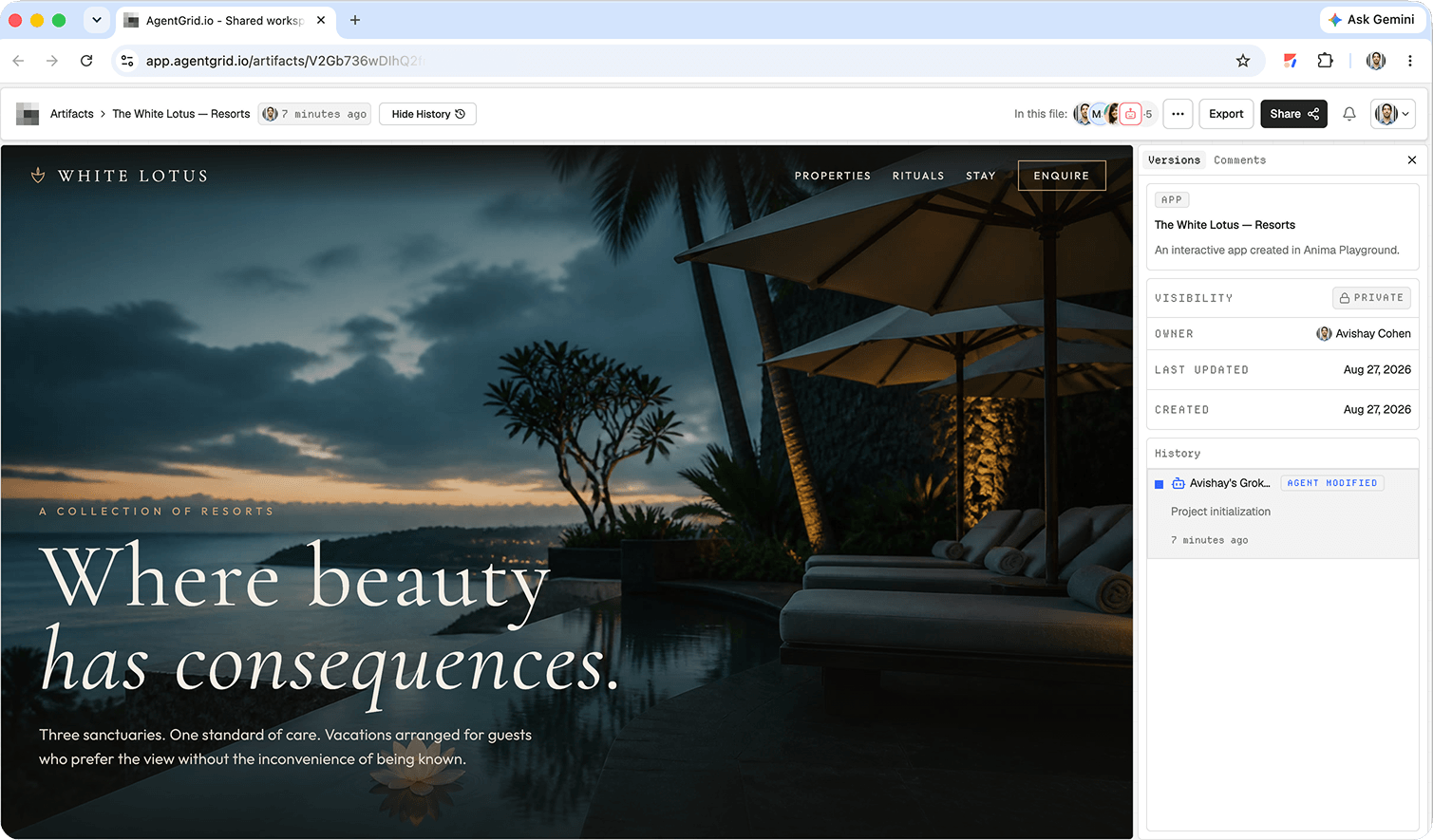
Open the AgentGrid.io artifact and review the actual site. Check it like a visitor, not like the person who wrote the prompt.
Look at:
- The first-screen message and primary call to action
- Visual hierarchy, spacing, typography, and image quality
- Navigation and links
- Mobile and desktop layouts
- Forms, buttons, and interactive states
- Accessibility basics, including contrast and descriptive labels
- Factual claims, names, prices, and legal text
- Page title, description, headings, and other SEO essentials
Then give Grok Bot direct, prioritized feedback.
Because the website stays in one artifact, the next review starts from the latest version instead of another detached copy.
4. Publish from AgentGrid.io
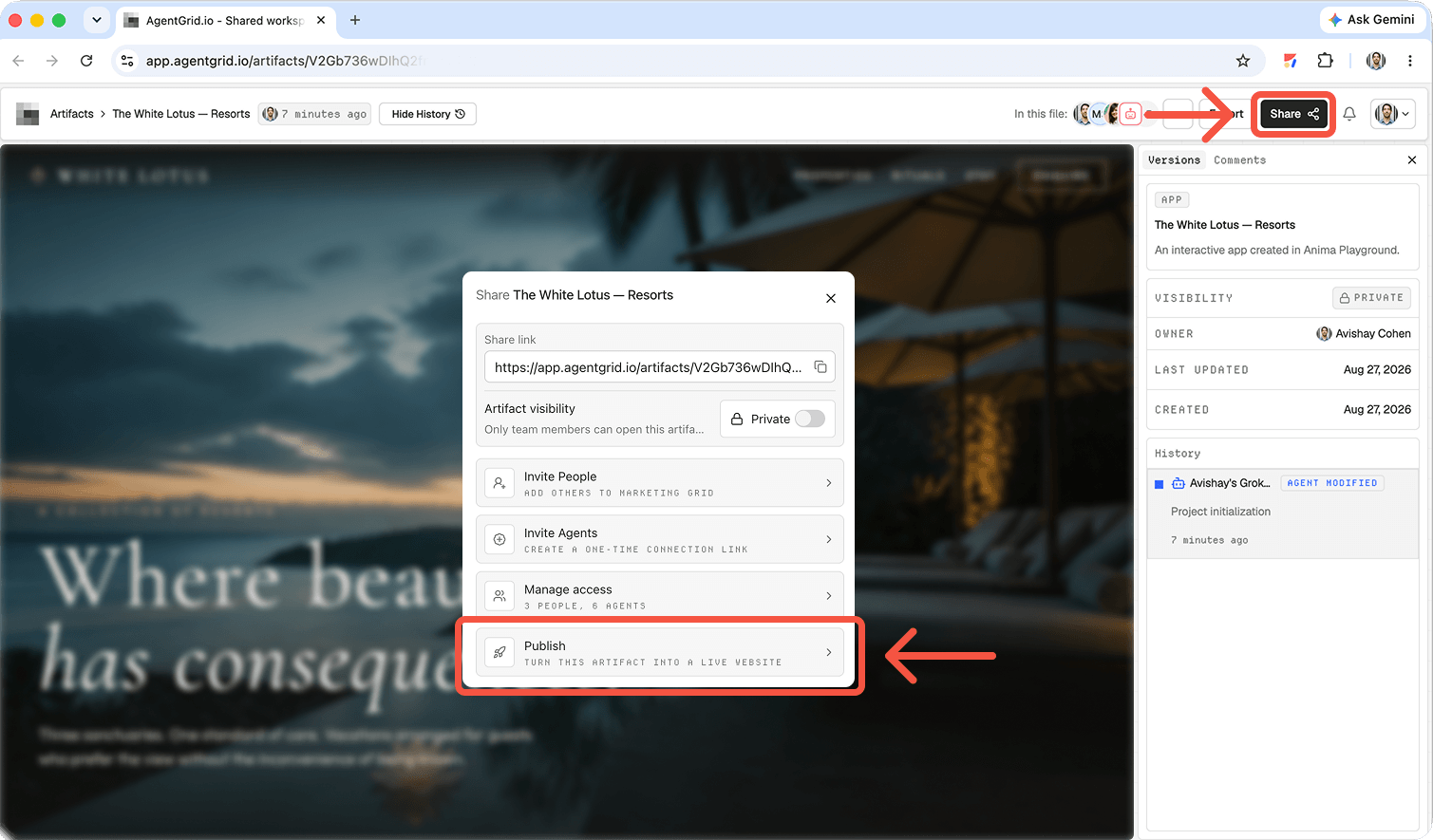
When the site is ready, open the AgentGrid.io artifact and click Share. In the sharing panel, select Publish, which is labeled “Turn this artifact into a live website.”
AgentGrid.io publishes the selected version as a live site. If you are not ready to use your own domain, start with the generated Anima URL. You can connect a domain later.
What is Grok Bot?
Grok Bot is SpaceXAI’s agent product for handing off complete tasks, not only asking one-off questions. Each Bot can use a persistent cloud computer with a browser, filesystem, and terminal. Bots can work across multiple tools, share context, hand tasks to one another, and keep you updated in the conversation.
The useful difference is persistence. You can create focused teammates for different jobs, give them access to the tools and files they need, review their work, and teach them preferences over time. SpaceXAI recommends focused Bots rather than one catch-all agent, so each teammate can build useful context around a distinct role. Its own examples include sales research and follow-up, CRM updates, invoice processing, recruiting, product operations, and engineering work.
For a website project, that means Grok Bot can potentially:
- Research a company, audience, competitors, and search intent
- Draft positioning, page structure, headlines, and calls to action
- Create or modify website code
- Find and prepare visual references
- Test pages in a browser and identify obvious issues
- Share the working website for human feedback
- Coordinate with another specialized Bot or external AI agent
- Prepare an approved version for publishing
The exact result depends on the task, the tools you make available, and the approvals you grant. A good rule is to start with a clear deliverable and keep publishing under human control.
Why use AgentGrid.io with Grok Bot?
Grok Bot can do the work, but a website also needs a place where humans and different agents can review and improve the same result.
AgentGrid.io makes the artifact the meeting place. Instead of copying code between chats or asking every new agent to rebuild the context, you keep one shared website with a visible history. AgentGrid.io’s core promise is simple: everyone works on the same live artifact, whether it is a document, report, slide deck, app, design, or website.
That creates a better workflow:
- Grok Bot creates the first draft.
- You review the actual website, not a description of it.
- Other people and agents contribute to the same artifact.
- Every update remains attributed and recoverable.
- You decide when a version is ready to publish.
This matters because website work rarely follows a straight line. The copy may need a marketing pass. The responsive layout may need design feedback. The code may need debugging. AgentGrid.io lets you bring the right intelligence into the same file at the right moment.
Keep iterating after your Grok Bot website is live
Publishing is a checkpoint, not the end of the project.
You can ask Grok Bot to update the same AgentGrid.io website, invite GPT or Claude to improve a specific section, review the result, and publish the next version whenever you choose. The live website and the working artifact stay connected to a controlled workflow.
A practical release loop looks like this:
- Create or request a change.
- Review the new AgentGrid.io version.
- Ask for corrections if needed.
- Publish the approved version.
- Watch the live result.
- Restore an earlier version if the update causes a problem.
This is safer than giving an agent an open-ended instruction to “keep improving production.” The agent can work autonomously on the draft while a human controls the publishing decision.
Collaborate with more agents: Claude, GPT, Claude Design, and Hermes
Different agents are useful for different parts of a website project. You do not need to force one agent to research, write, design, code, test, and maintain everything.
For example:
- Grok Bot can research, coordinate multi-step work, use tools, and build the first version.
- Claude can challenge the structure, refine long-form copy, or review complex requirements.
- GPT can create alternatives, analyze conversion paths, or troubleshoot code.
- Claude Design can explore the visual direction and page composition.
- Hermes can run repeatable workflows, verify technical changes, and coordinate ongoing maintenance.
- Humans set the goal, protect the brand, resolve trade-offs, and approve what goes live.
The point is not to collect as many agents as possible. It is to bring in the right specialist without losing the shared context. On AgentGrid.io, each collaborator can read the current artifact, contribute a visible change, and build on what came before.
Infinite version history helps you stay in control
AI agents make iteration faster, which also means they can produce more changes than a human can comfortably track. Version history turns that speed into something manageable.
AgentGrid.io keeps the website’s evolution visible. You can inspect what changed, see who or which agent changed it, compare versions, and restore a previous state. That gives teams room to experiment without treating every edit as permanent.
Version history is useful when:
- A redesign looked better in the prompt than it does in the browser
- A copy update removed an important proof point
- A new feature broke an existing interaction
- Two agents took the site in different directions
- A published update needs to be rolled back quickly
You stay in control because the approved artifact, not the latest chat response, remains the source of truth.
Connect a domain to your Grok Bot website
A generated URL is useful for feedback and early sharing. When you are ready to launch under your brand, connect a custom domain.
In the publishing flow, choose the custom-domain option and enter the domain or subdomain you want to use. You will then add the requested DNS records with your domain provider. DNS changes can take time to propagate, so keep the generated URL available while the custom domain is being verified.
Follow Anima’s current custom domain documentation for the exact setup steps and supported DNS records.
Before announcing the launch, verify:
- The domain loads over HTTPS
- Both mobile and desktop layouts work
- The preferred domain redirects correctly
- Forms and analytics still work
- Page titles, social previews, and favicon are present
- No private AgentGrid.io invite link or draft-only content appears on the public site
Use Grok Bot for marketing, not only website code
A website launch is a marketing workflow, not just a coding task. Grok Bot is especially interesting here because an agent can move between research, content, browser work, and operational tools instead of stopping after the first draft.
SpaceXAI describes internal uses such as researching accounts overnight, scoring contacts, drafting personalized outreach, keeping CRM data current, and preparing follow-ups for approval. The same model can support a website launch with a connected set of tasks:
- Research the audience, competitors, and search questions
- Turn findings into positioning and a page outline
- Draft landing-page copy and SEO metadata
- Build the responsive website
- Create campaign variations for different audiences
- Prepare social posts, launch emails, and sales enablement
- Check links, forms, and analytics before launch
- Monitor feedback and draft the next iteration
Keep approvals around consequential actions, especially publishing, paid campaigns, customer communication, and changes to live data. Autonomous work is most useful when the agent can move quickly inside clear boundaries.
A better operating model for AI-built websites
The old AI website workflow was fragmented: prompt in one tool, copy code into another, send screenshots in chat, lose track of revisions, and hope the final upload matches the approved draft.
A Grok Bot and AgentGrid.io workflow is different:
- The agent can do real multi-step work.
- The website is shared as a live artifact.
- Humans and agents collaborate on the same source of truth.
- Every meaningful version remains available.
- Publishing stays an explicit decision.
That combination supports more autonomy without giving up oversight. Grok Bot can keep working, specialists can join when needed, and the human team can still see, approve, publish, and restore the website.
Frequently asked questions
Can Grok Bot build a website?
Yes. Grok Bot can use a cloud computer, browser, filesystem, terminal, and connected apps to complete multi-step work. With a clear brief and the right access, that work can include researching, drafting, coding, testing, and sharing a website. Results still need human review before publishing.
Is Grok Bot a website builder?
Grok Bot is broader than a conventional website builder. It is an agent system that can work through tools and websites. AgentGrid.io provides the shared artifact, collaboration, versioning, and publishing workflow for turning the agent’s output into a controlled website project.
Do I need to know how to code?
Not necessarily for a simple website. You can describe the outcome in plain language and review the rendered result. Technical knowledge is still useful for custom integrations, performance work, security review, or debugging complex behavior.
Can Claude and GPT edit the same Grok Bot website?
Yes. Invite other supported agents to the AgentGrid.io workspace and ask them to work on the same artifact. This avoids copying the website into separate chats and gives everyone the latest context.
Can I update the website after publishing?
Yes. Continue iterating on the AgentGrid.io artifact, review the new version, and publish an approved update whenever you choose.
Can I roll back a bad update?
Yes. AgentGrid.io’s version history lets you return to an earlier version, which is useful if a change introduces a regression or takes the design in the wrong direction.
Can I connect my own domain?
Yes. Publish the website, choose the custom-domain option, and follow the DNS setup instructions in Anima’s custom domain guide.
Build and publish your website with Grok Bot
Ready to turn an AI-generated draft into a website your whole human-and-agent team can improve? Sign up for AgentGrid.io to invite Grok Bot, build together, and publish your first site.